<?xml version="1.0" encoding="utf-8"?><feed xmlns="http://www.w3.org/2005/Atom" ><generator uri="https://jekyllrb.com/" version="3.10.0">Jekyll</generator><link href="https://aristurtlehu.github.io/feed.xml" rel="self" type="application/atom+xml" /><link href="https://aristurtlehu.github.io/" rel="alternate" type="text/html" /><updated>2026-04-29T18:12:07+00:00</updated><id>https://aristurtlehu.github.io/feed.xml</id><title type="html">Renyi Yang</title><subtitle>personal description</subtitle><author><name>Renyi Yang</name><email>renyi.yang@grenoble-inp.org</email></author><entry><title type="html">Useless Machine - Arduino</title><link href="https://aristurtlehu.github.io/posts/Arduino-Useless-Machine/" rel="alternate" type="text/html" title="Useless Machine - Arduino" /><published>2026-03-21T00:00:00+00:00</published><updated>2026-03-21T00:00:00+00:00</updated><id>https://aristurtlehu.github.io/posts/Arduino</id><content type="html" xml:base="https://aristurtlehu.github.io/posts/Arduino-Useless-Machine/"><![CDATA[<p>A Tkinter-based Arduino control hub for the useless machine and the DC motor position control interface.</p>

<ul>
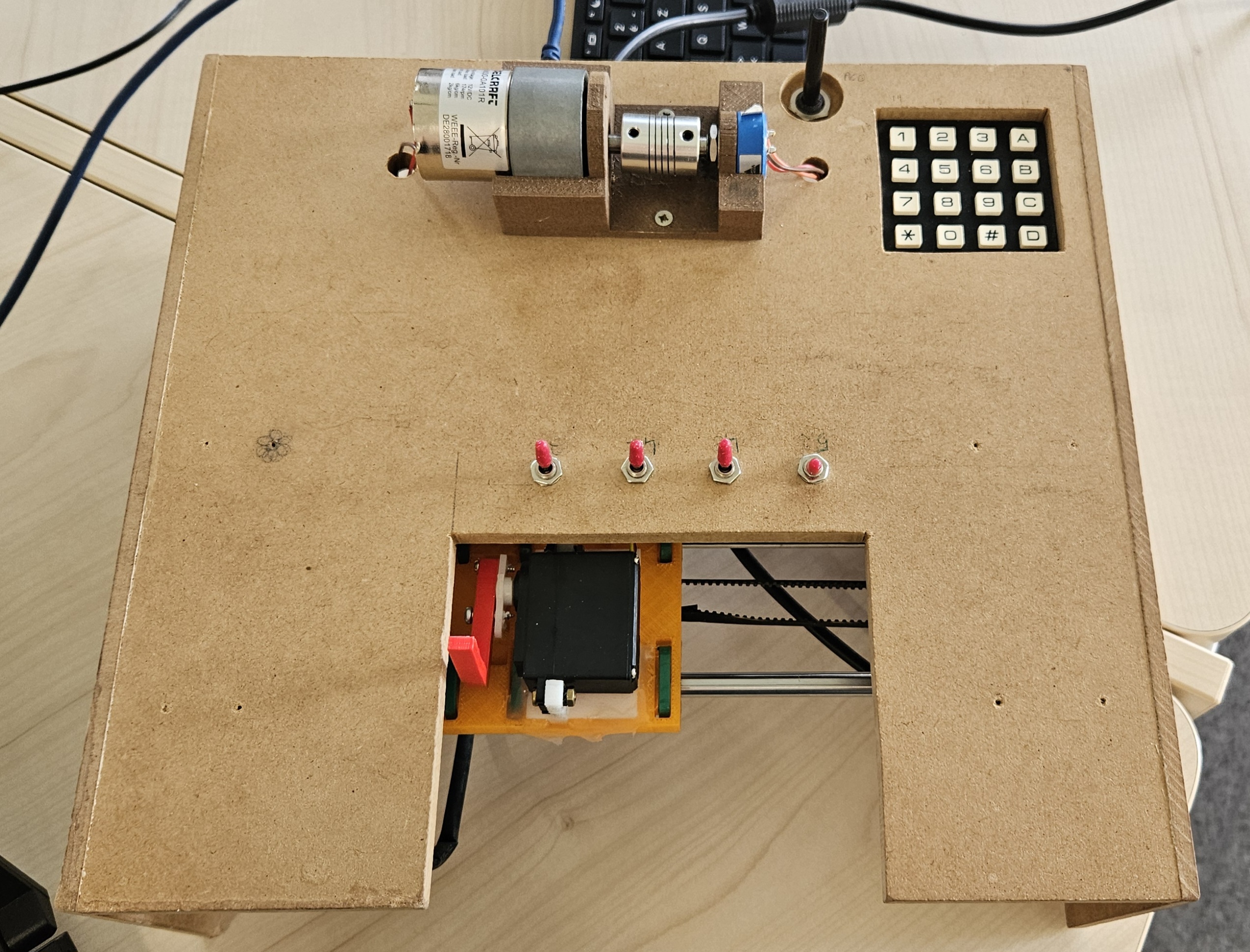
  <li>a classic useless machine that reacts to physical switches with a servo and stepper carriage</li>
  <li>a DC motor position control interface with P / PI control and live plotting through Banyan</li>
</ul>

<p>The main application starts with a hardware keypad login, then routes the user into a menu where each activity can be launched, stopped, and restarted independently.</p>

<p><img src="/images/arduino/images/machine.jpg" alt="Useless machine hardware" /></p>

<h2 id="project-overview">Project Overview</h2>

<p>The repository is organized around a few focused modules:</p>

<ul>
  <li><code class="language-plaintext highlighter-rouge">global_interface.py</code> is the main GUI application. It handles keypad authentication, the activity menu, runtime switching, and the live status dashboard.</li>
  <li><code class="language-plaintext highlighter-rouge">keypad.py</code> contains the keypad scanner abstraction used by the login flow.</li>
  <li><code class="language-plaintext highlighter-rouge">machine.py</code> drives the useless machine hardware: switches, stepper, and servo.</li>
  <li><code class="language-plaintext highlighter-rouge">motor.py</code> contains the DC motor, potentiometer, and fixed setpoint helpers.</li>
  <li><code class="language-plaintext highlighter-rouge">motor_control.py</code> implements the discrete P / PI position controller.</li>
  <li><code class="language-plaintext highlighter-rouge">motor_plot.py</code> publishes live motor telemetry over Banyan.</li>
  <li><code class="language-plaintext highlighter-rouge">motor_plot_subscriber.py</code> displays the live response plot in a separate process.</li>
  <li><code class="language-plaintext highlighter-rouge">archive/</code> keeps older experiments and previous interfaces for reference.</li>
</ul>

<h2 id="features">Features</h2>

<h3 id="keypad-login">Keypad login</h3>

<ul>
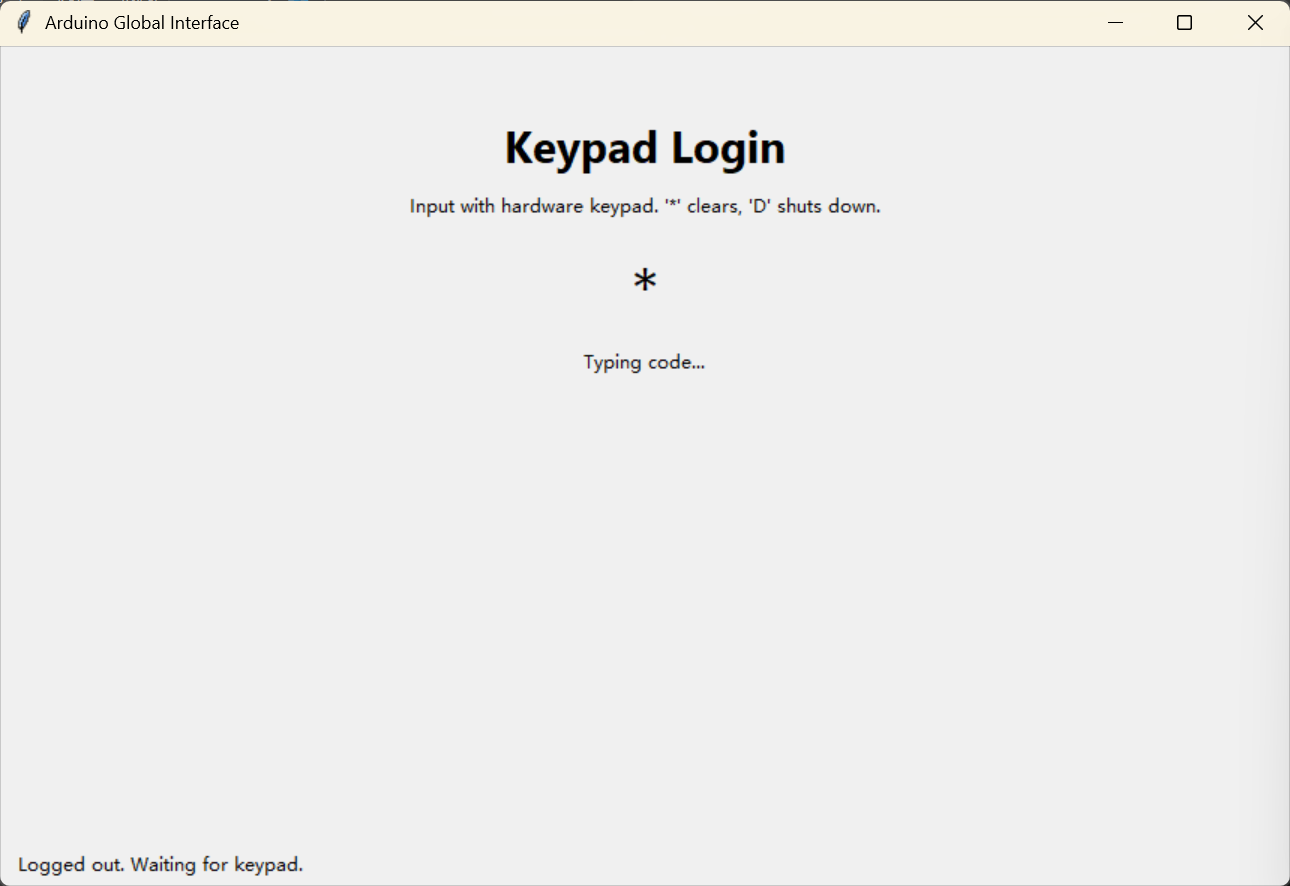
  <li>Callback-based key detection to avoid noisy polling on every edge.</li>
  <li>Timeout handling, input clearing with <code class="language-plaintext highlighter-rouge">*</code>, and shutdown request with <code class="language-plaintext highlighter-rouge">D</code>.</li>
  <li>A simple digit-code flow before the main menu unlocks.</li>
</ul>

<p><img src="/images/arduino/images/keypad.png" alt="Keypad detail" /></p>

<h3 id="useless-machine-mode">Useless machine mode</h3>

<ul>
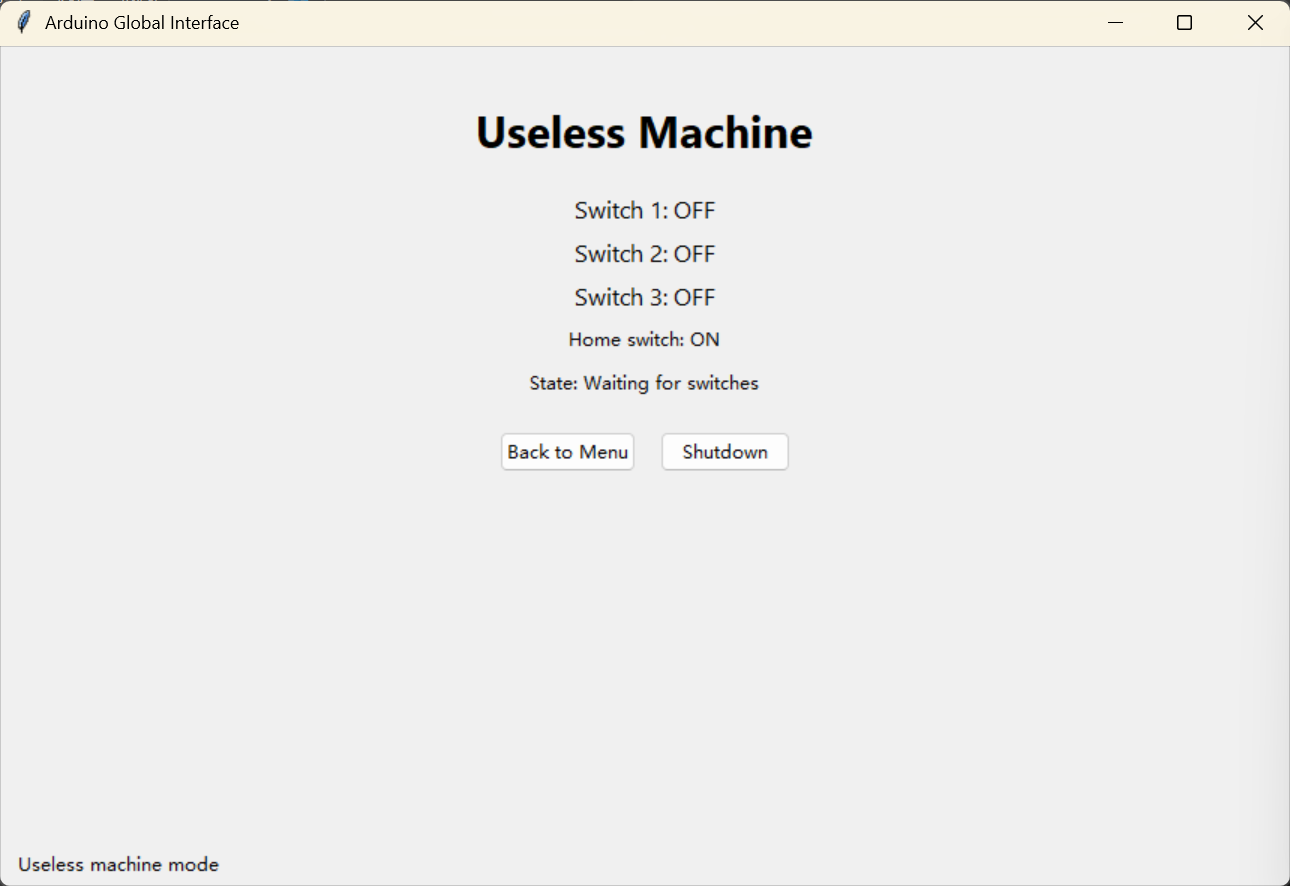
  <li>Stepper homing on startup for a stable reference point.</li>
  <li>Switch-driven behavior that moves the carriage to the active switch position.</li>
  <li>Servo deploy / retract sequence with automatic return-to-home after inactivity.</li>
  <li>Live telemetry in the GUI for switch states, home state, position, and action text.</li>
</ul>

<p><img src="/images/arduino/images/useless.png" alt="Useless machine mode in the GUI" /></p>

<h3 id="dc-motor-mode">DC motor mode</h3>

<ul>
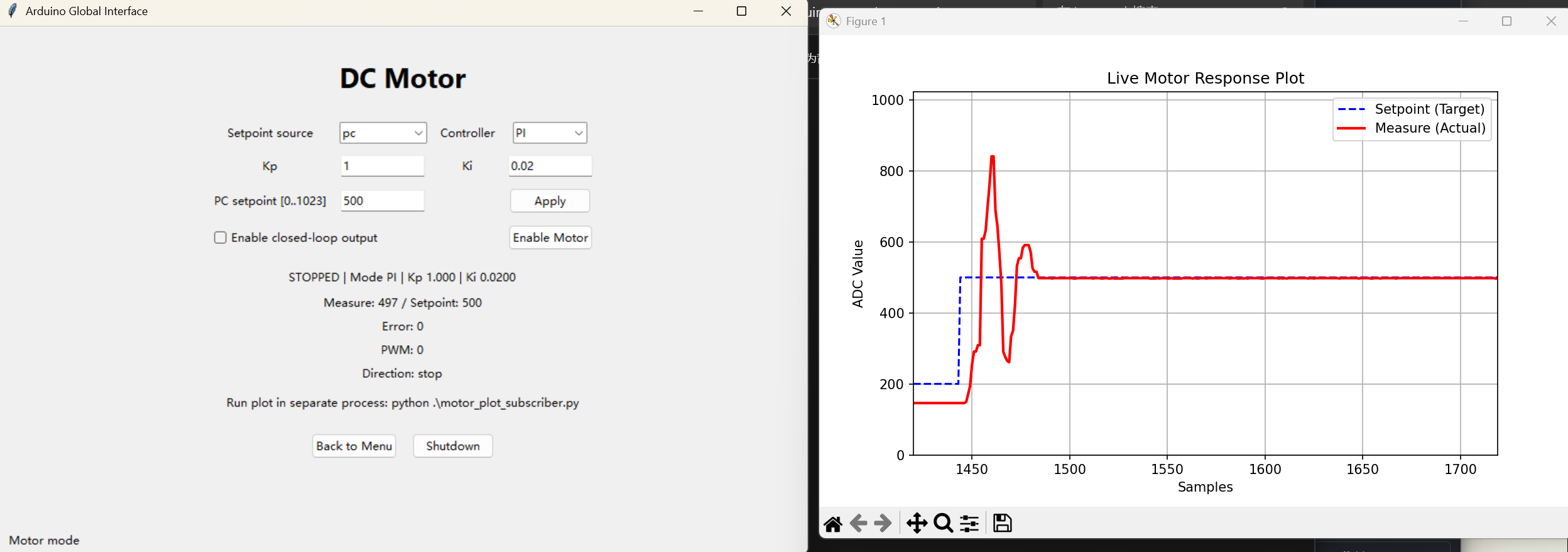
  <li>Manual or PC setpoint source selection.</li>
  <li>P and PI controller modes with tunable <code class="language-plaintext highlighter-rouge">Kp</code> and <code class="language-plaintext highlighter-rouge">Ki</code>.</li>
  <li>Anti-overreaction limits with bounded PWM output.</li>
  <li>Wrapped ADC error computation for circular position behavior.</li>
  <li>Live response publishing to a separate subscriber window.</li>
</ul>

<p><img src="/images/arduino/images/dc.png" alt="DC motor hardware" /></p>

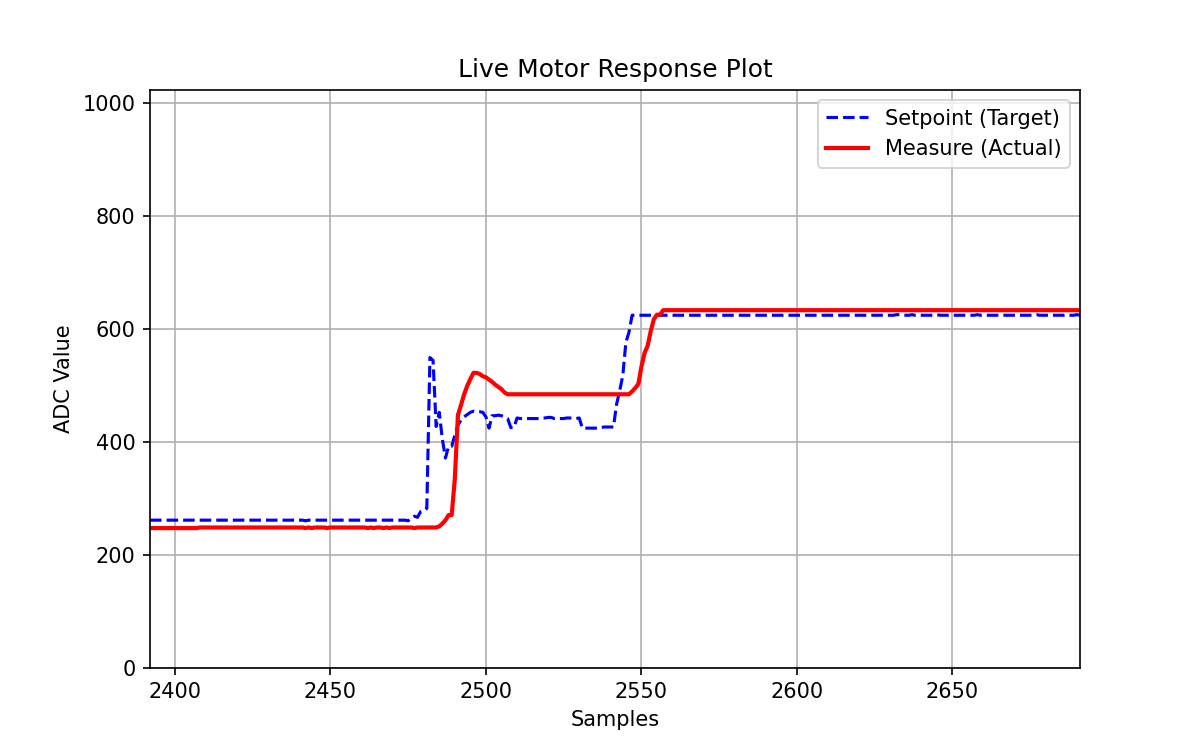
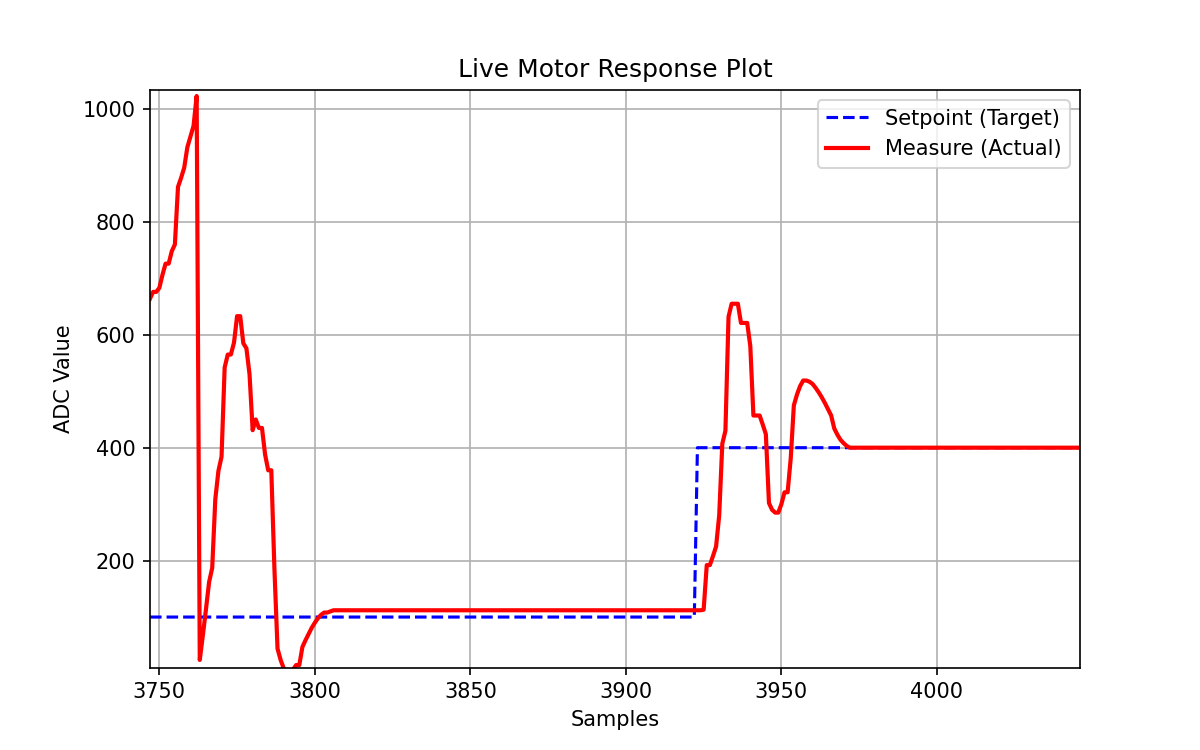
<h4 id="motor-control-graph-examples">Motor control graph examples</h4>

<p><img src="/images/arduino/images/graph1.png" alt="Motor response plot - tuned transient" /></p>

<p><img src="/images/arduino/images/graph2.png" alt="Motor response plot - steady response" /></p>

<h2 id="media">Media</h2>

<h3 id="demo-videos">Demo videos</h3>

<ul>
  <li><a href="/images/arduino/pre_videos/useless_machine.mp4">Useless machine demo</a></li>
  <li><a href="/images/arduino/pre_videos/motor_control.mp4">Motor control demo</a></li>
  <li><a href="/images/arduino/pre_videos/kp.mp4">Kp tuning</a></li>
  <li><a href="/images/arduino/pre_videos/kp_2.mp4">Kp tuning, example 2</a></li>
  <li><a href="/images/arduino/pre_videos/ki.mp4">Ki tuning</a></li>
  <li><a href="/images/arduino/pre_videos/ki_2.mp4">Ki tuning, example 2</a></li>
  <li><a href="/images/arduino/pre_videos/kp%26ki.mp4">Corner case</a></li>
</ul>

<h2 id="highlights">Highlights</h2>

<h3 id="keypad">Keypad</h3>

<ol>
  <li>Callback Triggered (just mark a flag, avoiding noise callback)</li>
  <li>Main polling loop (check flag, execute action, reset flag)</li>
</ol>

<h3 id="dc-motor">DC Motor</h3>

<p>The live plotting is decoupled from the main GUI to allow continuous updates without freezing the interface, using Banyan for inter-process communication.</p>

<ol>
  <li>0 &amp; 1023 corner cases</li>
  <li>Limited max pwm for no overreaction</li>
  <li>Banyan: set, measure, timestamp</li>
  <li>Kp, Ki (erase gap)</li>
</ol>

<h3 id="useless-machine">Useless Machine</h3>

<p>The useless machine logic is event-driven, responding to switch state changes and automatically returning to home after inactivity.</p>

<ol>
  <li>Callback Homing - No strange noise (at the beginning)</li>
  <li>Smooth Movement</li>
</ol>

<h3 id="overall">Overall</h3>

<p>The code is organized into focused modules for hardware control, GUI management, and control logic, making it easier to maintain and extend.</p>

<h2 id="hardware--software">Hardware / Software</h2>

<p>You will need:</p>

<ul>
  <li>Arduino board running Firmata-compatible control via <code class="language-plaintext highlighter-rouge">pymata4</code></li>
  <li>Matrix keypad</li>
  <li>DC motor with driver stage</li>
  <li>Potentiometers for position measurement and command input</li>
  <li>Stepper motor, servo, and switches for the useless machine mechanism</li>
  <li>Python packages: <code class="language-plaintext highlighter-rouge">pymata4</code>, <code class="language-plaintext highlighter-rouge">matplotlib</code>, and <code class="language-plaintext highlighter-rouge">python-banyan</code></li>
</ul>

<p><code class="language-plaintext highlighter-rouge">tkinter</code> is used for the GUI and is typically included with standard Python installations.</p>

<h2 id="how-to-run">How To Run</h2>

<p>Start the Banyan backplane first, then launch the plot subscriber, then the GUI:</p>

<div class="language-bash highlighter-rouge"><div class="highlight"><pre class="highlight"><code><span class="c"># 1</span>
backplane

<span class="c"># 2</span>
python ./motor_plot_subscriber.py

<span class="c"># 3</span>
python ./global_interface.py
</code></pre></div></div>

<p>The GUI starts on the keypad login screen. After authentication, use the menu to enter either activity.</p>

<h2 id="suggested-workflow">Suggested Workflow</h2>

<ol>
  <li>Start the backplane.</li>
  <li>Open the motor plot subscriber in a separate terminal.</li>
  <li>Launch the global interface.</li>
  <li>Use the keypad to log in.</li>
  <li>Choose either Useless Machine or DC Motor from the menu.</li>
</ol>

<h2 id="notes">Notes</h2>

<ul>
  <li>The keypad code is defined in <code class="language-plaintext highlighter-rouge">global_interface.py</code> and can be changed there.</li>
  <li>The separate plot window is intentionally decoupled from the GUI so the motor interface can keep running while the live graph updates.</li>
  <li>The <code class="language-plaintext highlighter-rouge">archive/</code> folder contains legacy versions of earlier keyboard and motor interfaces.</li>
</ul>]]></content><author><name>Renyi Yang</name><email>renyi.yang@grenoble-inp.org</email></author><category term="Arduino" /><category term="Banyan" /><category term="Tkinter GUI" /><category term="Keypad Detection" /><category term="DC Motor Control" /><category term="Python" /><summary type="html"><![CDATA[A Tkinter-based Arduino control hub for the useless machine and the DC motor position control interface.]]></summary></entry><entry><title type="html">Image Processing</title><link href="https://aristurtlehu.github.io/posts/Image-Processing/" rel="alternate" type="text/html" title="Image Processing" /><published>2026-03-21T00:00:00+00:00</published><updated>2026-03-21T00:00:00+00:00</updated><id>https://aristurtlehu.github.io/posts/Image-Processing</id><content type="html" xml:base="https://aristurtlehu.github.io/posts/Image-Processing/"><![CDATA[<p>A comprehensive collection of hands-on projects in image processing, implemented in Python with Jupyter notebooks.</p>

<h2 id="sessions-overview">Sessions Overview</h2>

<table>
  <thead>
    <tr>
      <th>Session</th>
      <th>Topic</th>
      <th>Key Techniques</th>
    </tr>
  </thead>
  <tbody>
    <tr>
      <td><strong>BE 1</strong></td>
      <td>Thresholding &amp; Morphology</td>
      <td>Binary segmentation, morphological operators, image cleanup</td>
    </tr>
    <tr>
      <td><strong>BE 2</strong></td>
      <td>Geometric Transformations</td>
      <td>Forward/backward mapping, coordinate systems, interpolation methods</td>
    </tr>
    <tr>
      <td><strong>BE 3</strong></td>
      <td>Feature Detection</td>
      <td>Harris corner detection, scale-space blob detection, feature matching</td>
    </tr>
    <tr>
      <td><strong>BE 4</strong></td>
      <td>Bag of Visual Words</td>
      <td>SIFT, KMeans clustering, TF-IDF, spatial pyramid pooling, image classification</td>
    </tr>
  </tbody>
</table>

<h2 id="key-concepts">Key Concepts</h2>

<ul>
  <li><strong>Image Segmentation</strong>: thresholding strategies, morphological operations, region-growing algorithms</li>
  <li><strong>Geometric Vision</strong>: coordinate transformations, image warping with bilinear interpolation, evaluation metrics (MSE, PSNR, SSIM)</li>
  <li><strong>Feature Extraction</strong>: Harris corner response, eigenvalue analysis, scale-invariant keypoint detection</li>
  <li><strong>Visual Recognition</strong>: building BoVW pipelines from scratch, vocabulary learning, similarity-based retrieval, SVM classification</li>
</ul>

<h2 id="quick-start">Quick Start</h2>

<p><strong>Requirements:</strong></p>
<ul>
  <li>Python 3.8+</li>
  <li>See <code class="language-plaintext highlighter-rouge">requirements.txt</code> or install:</li>
</ul>

<div class="language-bash highlighter-rouge"><div class="highlight"><pre class="highlight"><code>pip <span class="nb">install </span>numpy matplotlib scikit-image opencv-python scikit-learn scipy pandas jupyter
</code></pre></div></div>

<p><strong>Run the notebooks:</strong></p>

<p>Open any notebook in <code class="language-plaintext highlighter-rouge">BE_session_*/</code> and execute cells top-to-bottom.</p>

<h2 id="repository-structure">Repository Structure</h2>

<div class="language-plaintext highlighter-rouge"><div class="highlight"><pre class="highlight"><code>.
├── BE_session_1/
│   ├── BE-Thresholding-Morphology-Student.ipynb
│   ├── Images/
│   └── defects/
├── BE_session_2/
│   ├── TD2_login1_login_2.ipynb
│   ├── parrot.jpg
│   └── ground_truth.npy
├── BE_session_3/
│   ├── BE3_login1_login_2.ipynb
│   └── [test images]
├── BE_session_4/
│   ├── BE4_BoVW_student1_student2.ipynb
│   └── TD4-Student/data-BE4/
│       ├── breastmnist_128.npz
│       └── SUN/ (10-class scene subset)
└── README.md
</code></pre></div></div>

<h2 id="technologies-used">Technologies Used</h2>

<ul>
  <li><strong>Image Processing</strong>: scikit-image, OpenCV (cv2)</li>
  <li><strong>Numerical Computing</strong>: NumPy, SciPy</li>
  <li><strong>Machine Learning</strong>: scikit-learn (KMeans, SVM)</li>
  <li><strong>Visualization</strong>: Matplotlib</li>
  <li><strong>Development</strong>: Jupyter Notebooks</li>
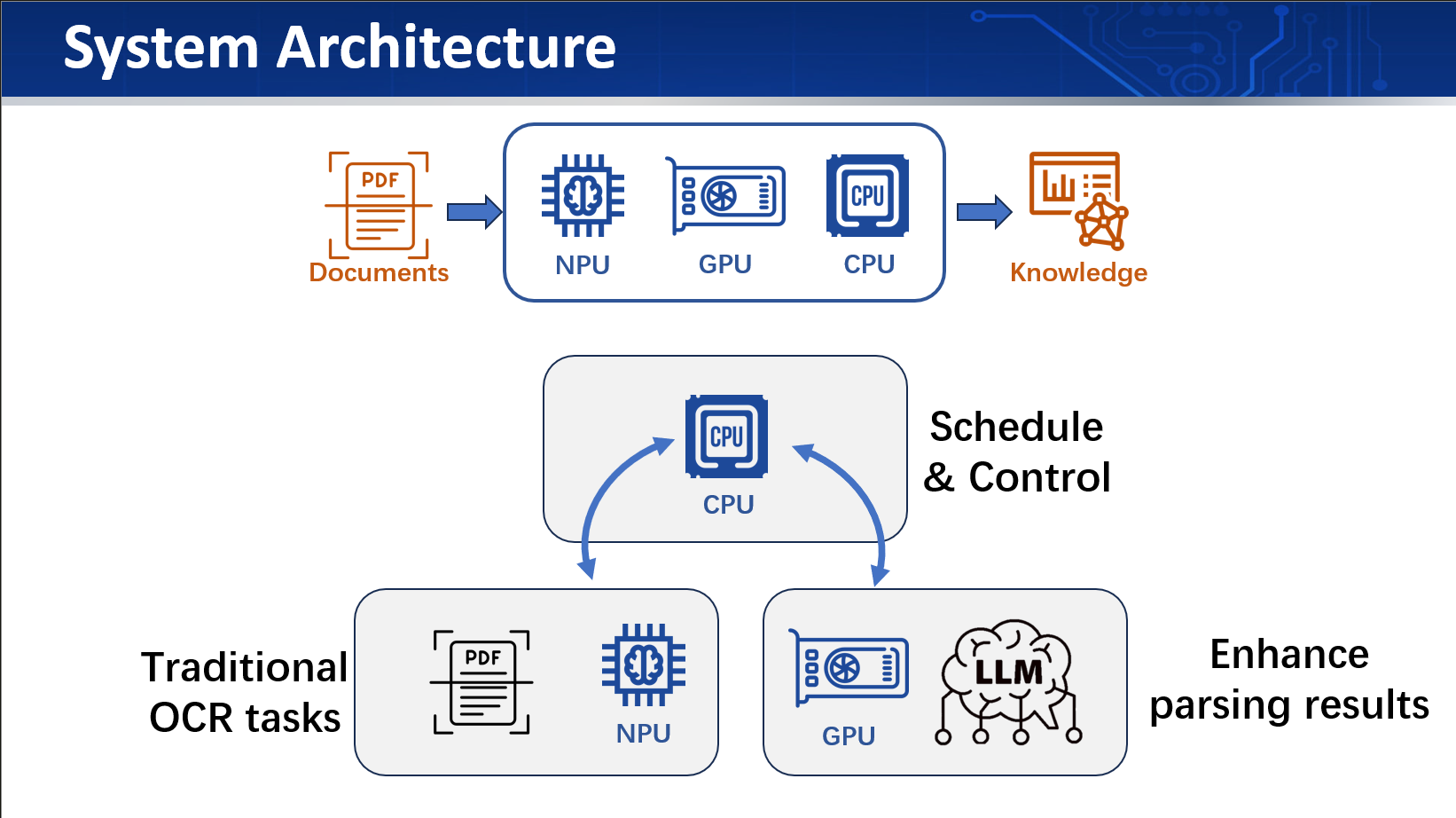
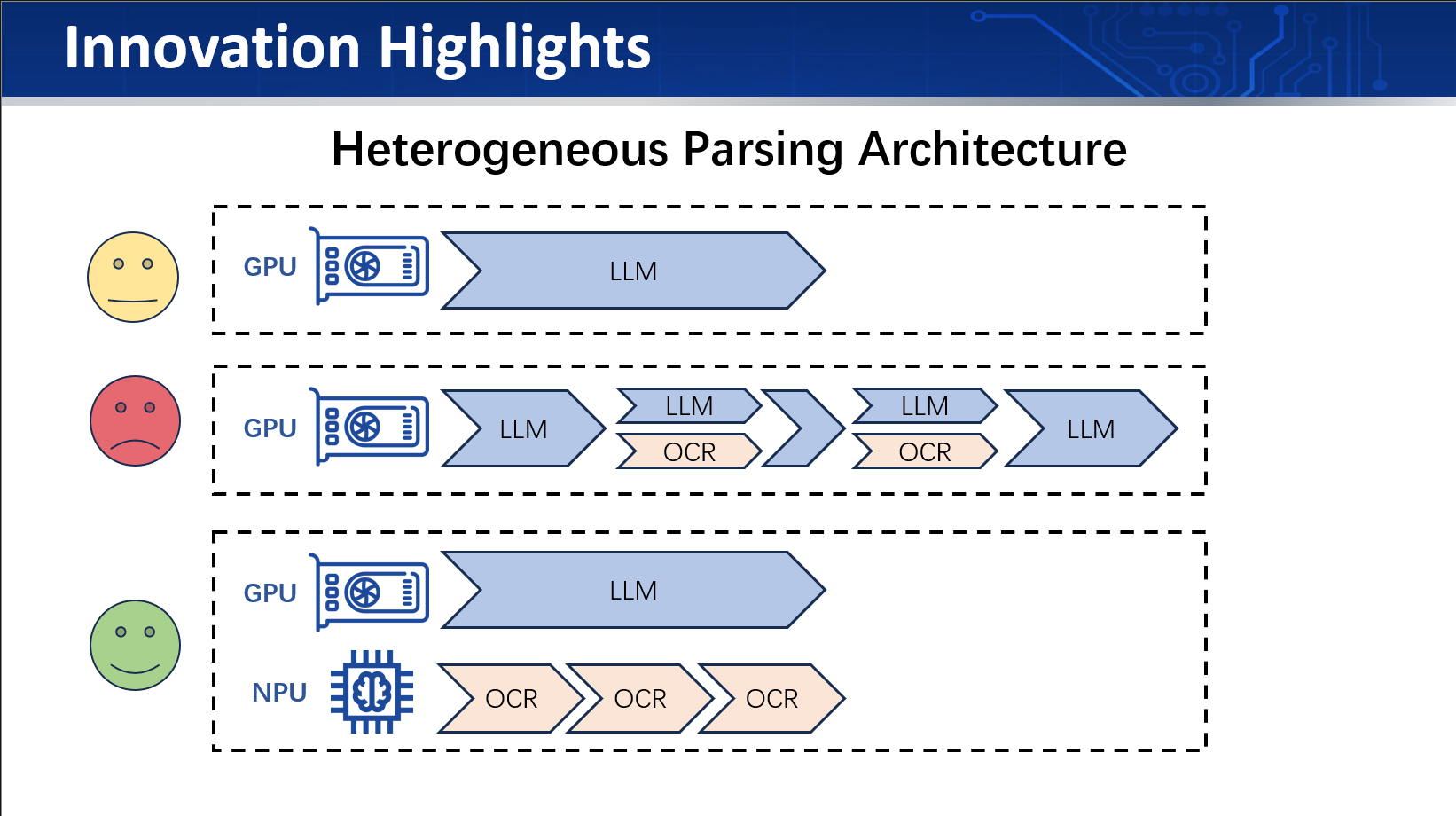
</ul>]]></content><author><name>Renyi Yang</name><email>renyi.yang@grenoble-inp.org</email></author><category term="Computer Vision" /><category term="Image Segmentation" /><category term="Feature Detection" /><category term="Morphological Operations" /><category term="Harris Corner Detection" /><category term="SIFT" /><category term="Python" /><summary type="html"><![CDATA[A comprehensive collection of hands-on projects in image processing, implemented in Python with Jupyter notebooks.]]></summary></entry><entry><title type="html">AMD HeterOCR</title><link href="https://aristurtlehu.github.io/posts/AMD-HeterOCR/" rel="alternate" type="text/html" title="AMD HeterOCR" /><published>2025-11-05T00:00:00+00:00</published><updated>2025-11-05T00:00:00+00:00</updated><id>https://aristurtlehu.github.io/posts/AMD</id><content type="html" xml:base="https://aristurtlehu.github.io/posts/AMD-HeterOCR/"><![CDATA[<p>A heterogeneous computing system that integrates CPU, GPU, and NPU resources to accelerate OCR tasks.</p>

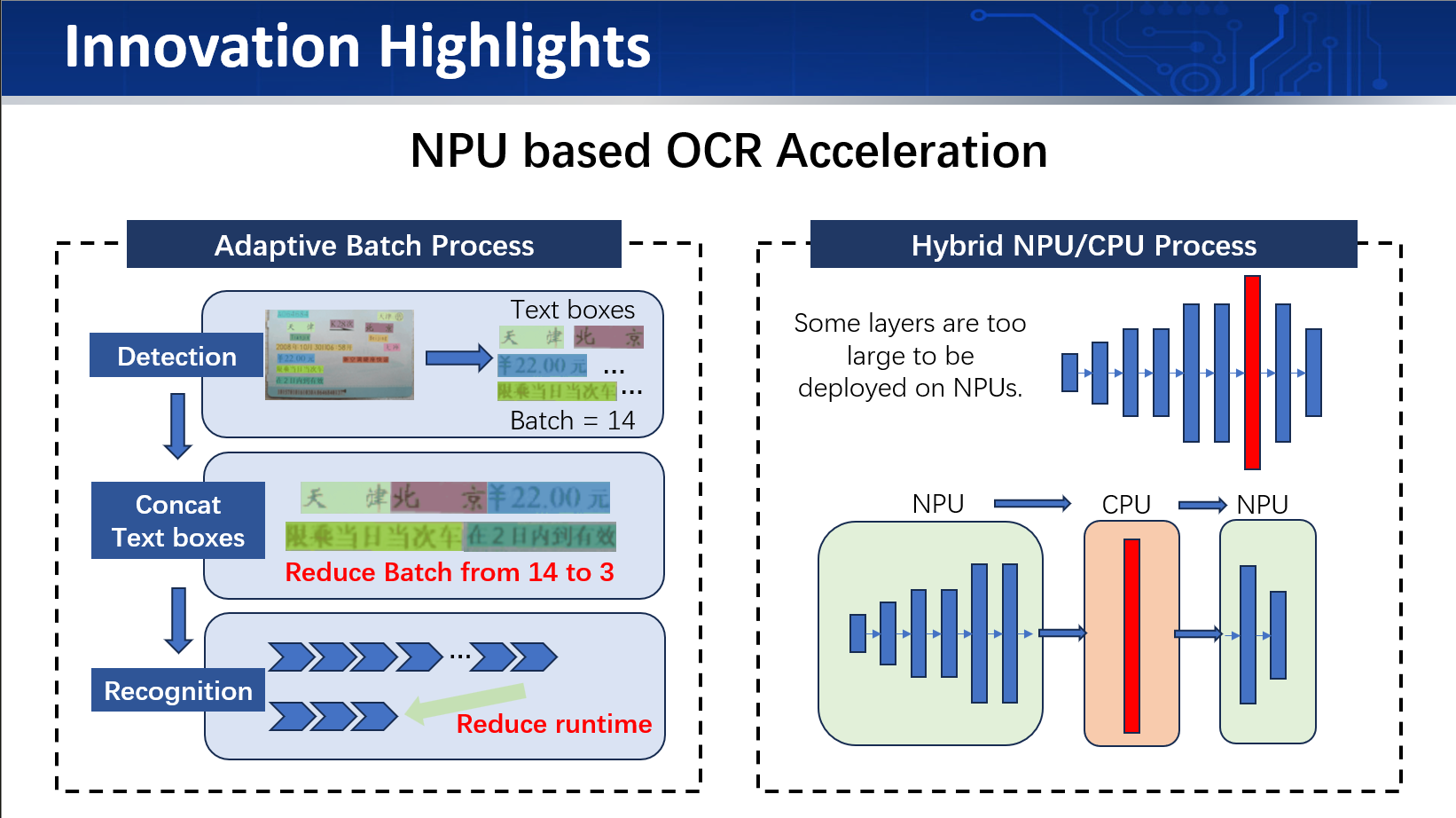
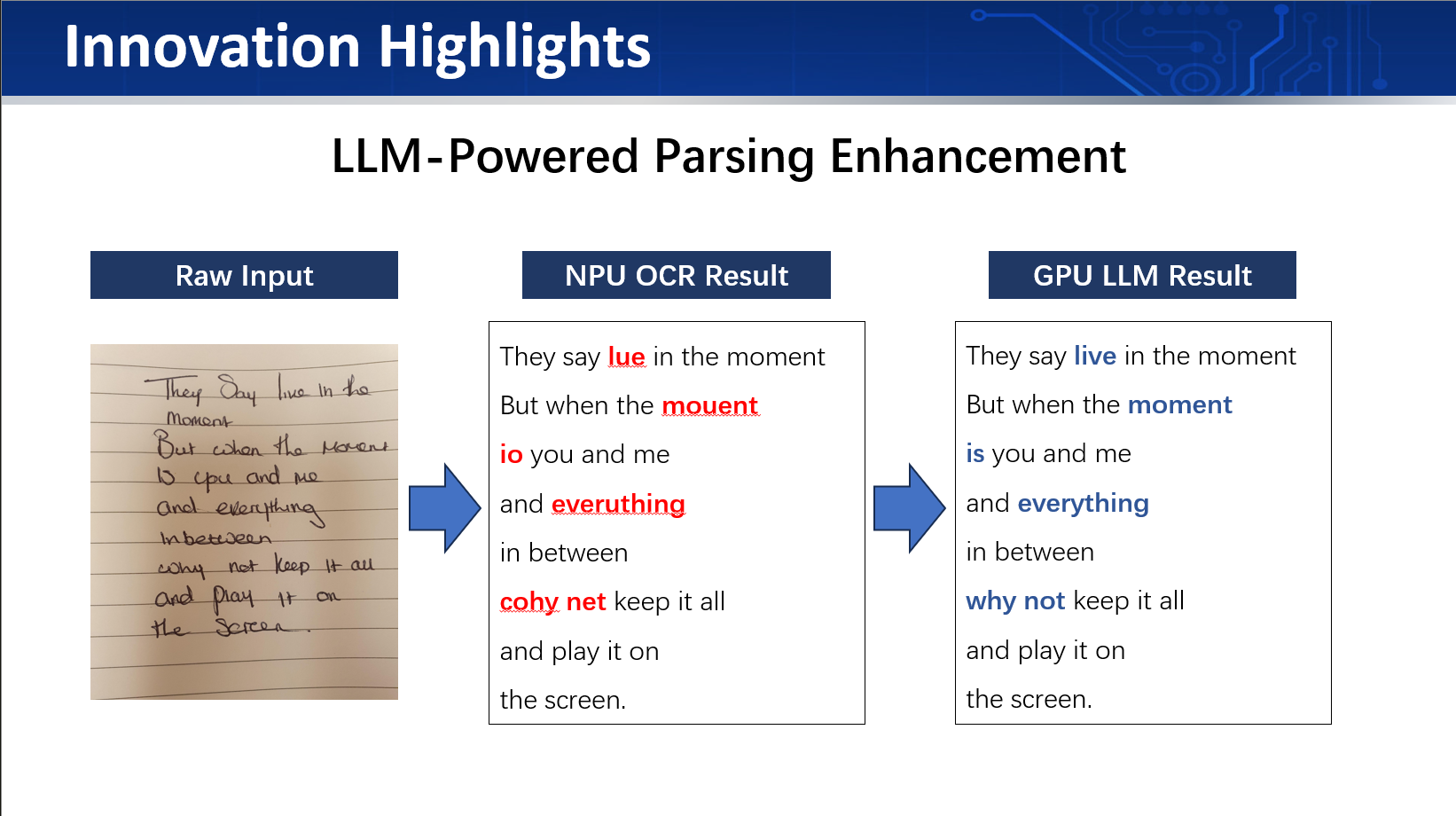
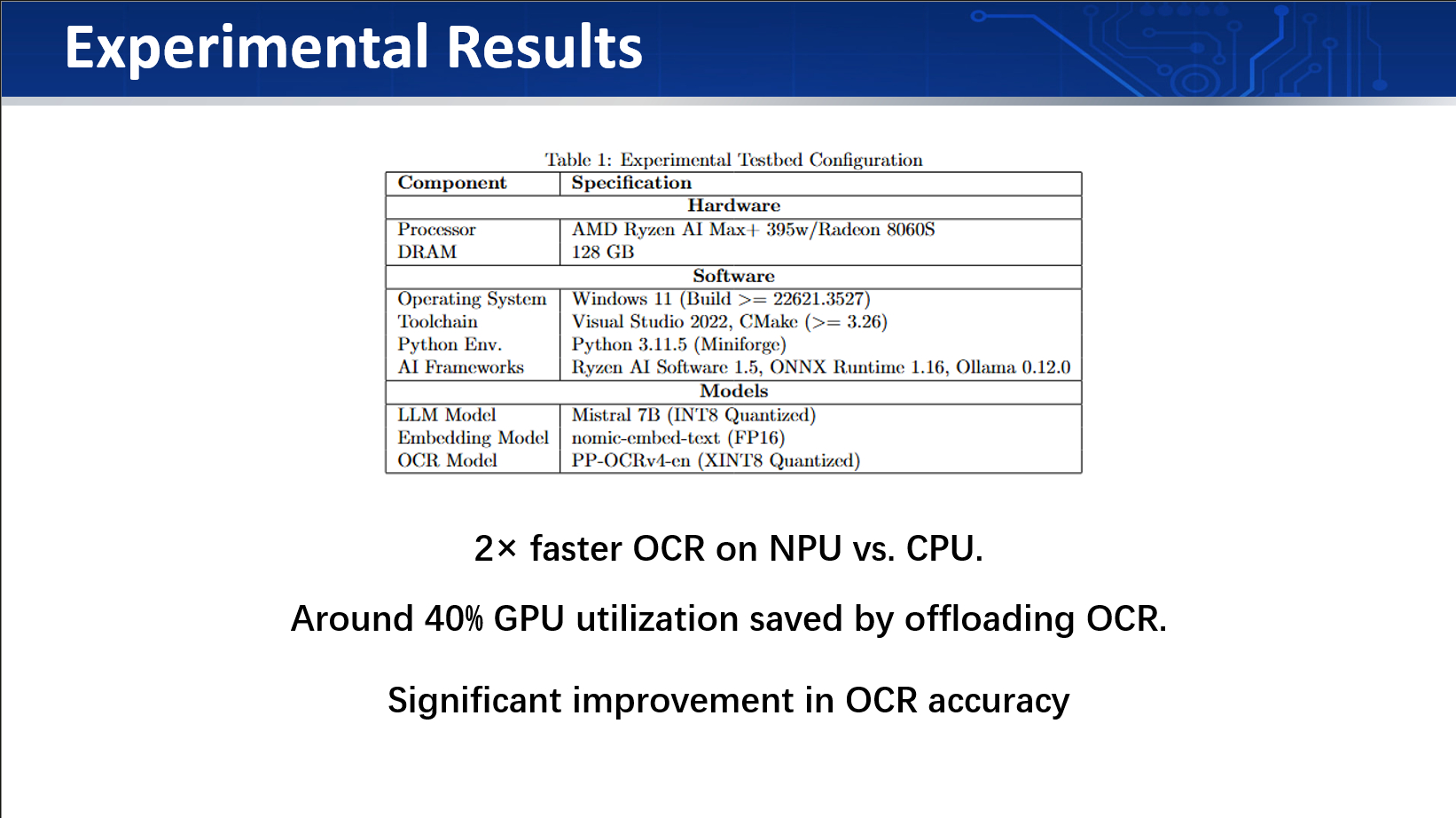
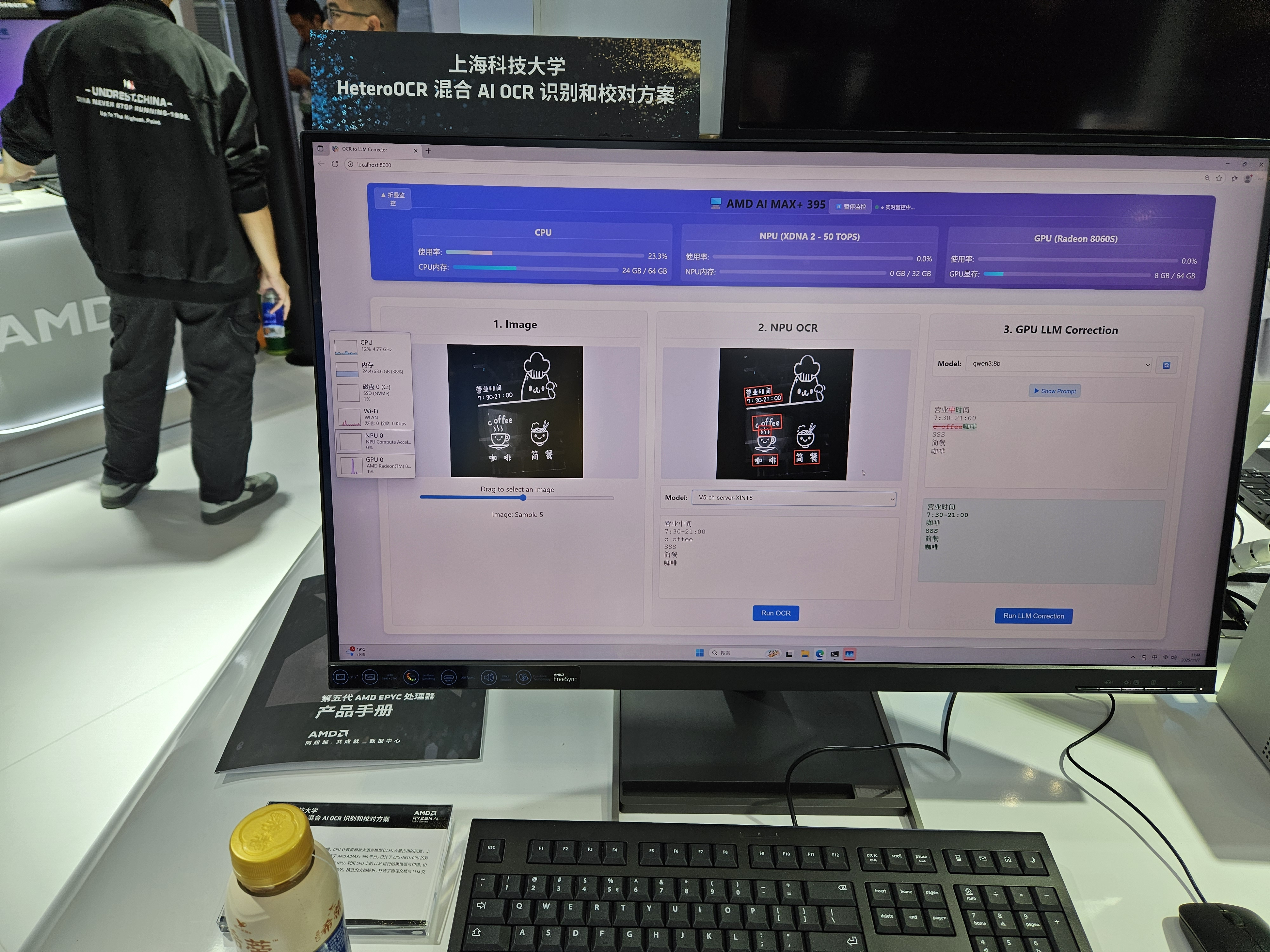
<p>The system is designed to leverage the strengths of each processing unit to achieve high performance and efficiency in OCR applications.</p>

<h1 id="amd-heterocr">AMD HeterOCR</h1>

<p><img src="/images/intern/amd/system_arch.png" alt="" /></p>

<p><img src="/images/intern/amd/highlight.png" alt="" /></p>

<p><img src="/images/intern/amd/highlight2.png" alt="" /></p>

<p><img src="/images/intern/amd/highlight3.png" alt="" /></p>

<p><img src="/images/intern/amd/result.png" alt="" /></p>

<h2 id="ciie-2025">CIIE 2025</h2>

<p><img src="/images/intern/amd/ciie.jpg" alt="" /></p>]]></content><author><name>Renyi Yang</name><email>renyi.yang@grenoble-inp.org</email></author><category term="Internship" /><category term="CPU/GPU/NPU HeterOCR" /><category term="CIIE 2025 exhibition" /><summary type="html"><![CDATA[A heterogeneous computing system that integrates CPU, GPU, and NPU resources to accelerate OCR tasks.]]></summary></entry><entry><title type="html">A Go-based acoustic communication system</title><link href="https://aristurtlehu.github.io/posts/A-Go-based-acoustic-communication-system/" rel="alternate" type="text/html" title="A Go-based acoustic communication system" /><published>2025-09-20T00:00:00+00:00</published><updated>2025-09-20T00:00:00+00:00</updated><id>https://aristurtlehu.github.io/posts/Above-IP</id><content type="html" xml:base="https://aristurtlehu.github.io/posts/A-Go-based-acoustic-communication-system/"><![CDATA[<p>A network communication system demonstrating UDP-based DNS resolution and TCP-based HTTP requests over an acoustic physical layer using <strong>Go</strong>.</p>

<p>This project implements essential transport layer protocols (UDP and TCP) over sound waves, enabling real-world internet services like domain name resolution and web page retrieval through audio signals.</p>

<h2 id="table-of-contents">Table of Contents</h2>

<ul>
  <li><a href="#table-of-contents">Table of Contents</a></li>
  <li><a href="#overview">Overview</a></li>
  <li><a href="#core-features">Core Features</a>
    <ul>
      <li><a href="#udp-dns-resolution">UDP DNS Resolution</a></li>
      <li><a href="#tcp-http-implementation">TCP HTTP Implementation</a></li>
      <li><a href="#lower-layers-brief">Lower Layers (Brief)</a></li>
    </ul>
  </li>
  <li><a href="#architecture">Architecture</a></li>
  <li><a href="#prerequisites">Prerequisites</a></li>
  <li><a href="#installation">Installation</a></li>
  <li><a href="#environment-setup">Environment Setup</a>
    <ul>
      <li><a href="#1-start-jack-server">1. Start JACK Server</a></li>
      <li><a href="#2-install-microsoft-loopback-adapter">2. Install Microsoft Loopback Adapter</a></li>
      <li><a href="#3-configure-network-interfaces">3. Configure Network Interfaces</a></li>
      <li><a href="#4-get-network-interface-name">4. Get Network Interface Name</a></li>
    </ul>
  </li>
  <li><a href="#usage">Usage</a>
    <ul>
      <li><a href="#dns-query-example">DNS Query Example</a></li>
      <li><a href="#http-request-example">HTTP Request Example</a></li>
    </ul>
  </li>
  <li><a href="#project-structure">Project Structure</a></li>
  <li><a href="#implementation-details">Implementation Details</a>
    <ul>
      <li><a href="#udp-and-dns-implementation">UDP and DNS Implementation</a></li>
      <li><a href="#tcp-and-http-implementation">TCP and HTTP Implementation</a></li>
    </ul>
  </li>
  <li><a href="#configuration-parameters">Configuration Parameters</a></li>
  <li><a href="#troubleshooting">Troubleshooting</a>
    <ul>
      <li><a href="#dns-resolution-fails">DNS Resolution Fails</a></li>
      <li><a href="#tcp-connection-timeout">TCP Connection Timeout</a></li>
      <li><a href="#http-response-incomplete">HTTP Response Incomplete</a></li>
      <li><a href="#no-audio-io">No Audio I/O</a></li>
      <li><a href="#high-packet-loss">High Packet Loss</a></li>
    </ul>
  </li>
</ul>

<h2 id="overview">Overview</h2>

<p>This project focuses on implementing <strong>transport layer protocols over acoustic communication</strong>. The main achievements are:</p>

<ol>
  <li><strong>UDP-based DNS Resolution</strong>: A complete DNS client that sends DNS queries using UDP and resolves domain names (e.g., <code class="language-plaintext highlighter-rouge">www.example.com</code> → <code class="language-plaintext highlighter-rouge">93.184.216.34</code>)</li>
  <li><strong>TCP-based HTTP Requests</strong>: A TCP client that establishes connections via 3-way handshake, sends HTTP GET requests, and receives web page content</li>
  <li><strong>Acoustic Physical Layer</strong>: Uses sound waves (audio signals) as the transmission medium instead of electrical cables</li>
</ol>

<p>The system enables a node behind a NAT gateway to access internet services through acoustic communication with another node that has internet connectivity.</p>

<h2 id="core-features">Core Features</h2>

<h3 id="udp-dns-resolution">UDP DNS Resolution</h3>

<p>The DNS implementation provides domain name resolution functionality:</p>

<p><strong>Key Components:</strong></p>
<ul>
  <li><strong>DNS Query Generation</strong>: Creates standard DNS query packets with proper format (DNS header, questions section, A record type)</li>
  <li><strong>UDP Transport</strong>: Wraps DNS queries in UDP datagrams (port 53)</li>
  <li><strong>Query ID Tracking</strong>: Assigns unique IDs to each query and tracks pending responses</li>
  <li><strong>Response Parsing</strong>: Extracts IP addresses from DNS response packets</li>
  <li><strong>Upstream DNS</strong>: Forwards queries to external DNS servers (1.1.1.1, 8.8.8.8)</li>
  <li><strong>Timeout Handling</strong>: 5-second timeout for unresponsive queries</li>
  <li><strong>Caching</strong>: Stores resolved domains for 5 minutes to reduce redundant queries</li>
</ul>

<p><strong>Workflow:</strong></p>
<ol>
  <li>User executes <code class="language-plaintext highlighter-rouge">ping www.example.com</code></li>
  <li>Node 1 creates DNS query packet with unique ID</li>
  <li>Query wrapped in UDP datagram and sent via acoustic link to Node 2</li>
  <li>Node 2 (NAT gateway) forwards query to internet DNS server (1.1.1.1)</li>
  <li>DNS response received from internet</li>
  <li>Node 2 sends response back through acoustic link</li>
  <li>Node 1 extracts IP address and proceeds with ping/curl</li>
</ol>

<h3 id="tcp-http-implementation">TCP HTTP Implementation</h3>

<p>The TCP implementation enables reliable HTTP communication:</p>

<p><strong>Key Components:</strong></p>
<ul>
  <li><strong>3-Way Handshake</strong>: Complete SYN → SYN-ACK → ACK connection establishment</li>
  <li><strong>State Machine</strong>: Tracks connection states (CLOSED → SYN_SENT → ESTABLISHED → FIN_WAIT)</li>
  <li><strong>Sequence Numbers</strong>: Maintains proper sequence and acknowledgment numbers</li>
  <li><strong>Data Transmission</strong>: Sends HTTP GET requests with PSH+ACK flags</li>
  <li><strong>Reliable Delivery</strong>: Handles ACKs and retransmissions</li>
  <li><strong>Connection Teardown</strong>: FIN handshake for clean connection closure</li>
  <li><strong>HTTP Request Generation</strong>: Constructs valid HTTP/1.0 GET requests</li>
  <li><strong>Response Buffering</strong>: Accumulates TCP segments into complete HTTP response</li>
</ul>

<p><strong>Workflow:</strong></p>
<ol>
  <li>User executes <code class="language-plaintext highlighter-rouge">curl www.example.com</code></li>
  <li>Node 1 resolves domain to IP (93.184.216.34) via DNS</li>
  <li>Node 1 initiates TCP connection:
    <ul>
      <li>Sends SYN packet through acoustic link</li>
      <li>Node 2 forwards to internet server</li>
      <li>Receives SYN-ACK from server via Node 2</li>
      <li>Sends ACK to complete handshake</li>
    </ul>
  </li>
  <li>Node 1 sends HTTP GET request in PSH+ACK segment</li>
  <li>Node 2 forwards request to web server</li>
  <li>Web server responds with HTTP headers and HTML content</li>
  <li>Node 2 forwards response segments back through acoustic link</li>
  <li>Node 1 reassembles segments and displays HTTP response</li>
  <li>Connection closed with FIN handshake</li>
</ol>

<h3 id="lower-layers-brief">Lower Layers (Brief)</h3>

<p>To support UDP and TCP over acoustic communication, several lower layers are implemented:</p>

<p><strong>Physical Layer</strong> (<a href="https://github.com/AristurtleHu/Above-IP/tree/aethernet/src/phy/">src/phy/</a>):</p>
<ul>
  <li><strong>Chirp Preamble</strong>: 2-10kHz frequency sweep for frame synchronization</li>
  <li><strong>Manchester Encoding</strong>: Line coding for reliable bit transmission</li>
  <li><strong>CRC-16</strong>: Error detection for frame integrity</li>
  <li><strong>JACK Audio</strong>: 48kHz sample rate audio I/O</li>
</ul>

<p><strong>Data Link Layer</strong> (<a href="https://github.com/AristurtleHu/Above-IP/tree/aethernet/src/data_link/">src/data_link/</a>):
<a href="https://github.com/AristurtleHu/Multiple-Access">[code]</a></p>
<ul>
  <li><strong>CSMA/CA</strong>: Carrier sense multiple access with collision avoidance</li>
  <li><strong>ACK Frames</strong>: Acknowledgment frames for received data</li>
  <li><strong>Sliding Window</strong>: Selective repeat ARQ for reliable delivery</li>
  <li>
    <table>
      <tbody>
        <tr>
          <td><strong>Frame Format</strong>: [Preamble</td>
          <td>Header</td>
          <td>Payload</td>
          <td>CRC]</td>
        </tr>
      </tbody>
    </table>
  </li>
</ul>

<p><strong>Network Layer</strong> (<a href="https://github.com/AristurtleHu/Above-IP/tree/aethernet/src/ip/">src/ip/</a>):
<a href="https://github.com/AristurtleHu/To-the-Internet">[code]</a></p>
<ul>
  <li><strong>IP Routing</strong>: Basic IPv4 packet forwarding</li>
  <li><strong>ICMP</strong>: Ping functionality (echo request/reply)</li>
  <li><strong>NAT</strong>: Network Address Translation for internet access</li>
</ul>

<p>These layers provide the foundation for reliable packet delivery, you may check our previous repo’s code.</p>

<h2 id="architecture">Architecture</h2>

<div class="language-plaintext highlighter-rouge"><div class="highlight"><pre class="highlight"><code>┌─────────────────────────────────────────────────────────┐
│         Application Layer                               │
│         [HTTP Requests, DNS Queries]                    │
│         ↑                                               │
│         curl www.example.com                            │
│         ping www.google.com                             │
├─────────────────────────────────────────────────────────┤
│         Transport Layer                                 │
│         [TCP: 3-way handshake, reliable delivery]       │
│         [UDP: DNS queries to port 53]                   │
├─────────────────────────────────────────────────────────┤
│         Network Layer                                   │
│         [IP Routing, NAT, ICMP]                         │
├─────────────────────────────────────────────────────────┤
│         Data Link Layer                                 │
│         [CSMA/CA, Framing, ACK]                         │
├─────────────────────────────────────────────────────────┤
│         Physical Layer                                  │
│         [Chirp, Manchester, CRC]                        │
│         JACK Audio Server (48kHz)                       │
└─────────────────────────────────────────────────────────┘
</code></pre></div></div>

<h2 id="prerequisites">Prerequisites</h2>

<ul>
  <li><strong>Go 1.25+</strong>: Install from <a href="https://golang.org/">golang.org</a></li>
  <li><strong>JACK Audio Server</strong>: Required for audio I/O
    <ul>
      <li>Windows: Download from <a href="https://jackaudio.org/">jackaudio.org</a></li>
      <li>Install ASIO4ALL driver for low-latency audio</li>
    </ul>
  </li>
  <li><strong>Network Requirements</strong>:
    <ul>
      <li>Microsoft KM-TEST Loopback Adapter</li>
      <li>Audio cables or speakers/microphones for acoustic coupling</li>
    </ul>
  </li>
</ul>

<h2 id="installation">Installation</h2>

<ol>
  <li>
    <p>Clone the repository:</p>
  </li>
  <li>
    <p>Install Go dependencies:</p>
    <div class="language-bash highlighter-rouge"><div class="highlight"><pre class="highlight"><code>go mod download
</code></pre></div>    </div>
  </li>
</ol>

<h2 id="environment-setup">Environment Setup</h2>

<h3 id="1-start-jack-server">1. Start JACK Server</h3>

<div class="language-powershell highlighter-rouge"><div class="highlight"><pre class="highlight"><code><span class="n">cd</span><span class="w"> </span><span class="s2">"C:\Program Files\JACK2\"</span><span class="w">
</span><span class="o">.</span><span class="n">\jackd.exe</span><span class="w"> </span><span class="nt">-S</span><span class="w"> </span><span class="nt">-X</span><span class="w"> </span><span class="nx">winmme</span><span class="w"> </span><span class="nt">-dportaudio</span><span class="w"> </span><span class="nt">-d</span><span class="s2">"ASIO::ASIO4ALL v2"</span><span class="w"> </span><span class="nt">-r48000</span><span class="w"> </span><span class="nt">-p128</span><span class="w">
</span></code></pre></div></div>

<p><strong>Parameters:</strong></p>
<ul>
  <li><code class="language-plaintext highlighter-rouge">-r48000</code>: Sample rate of 48kHz</li>
  <li><code class="language-plaintext highlighter-rouge">-p128</code>: Buffer size of 128 samples (adjust for latency/stability trade-off)</li>
</ul>

<h3 id="2-install-microsoft-loopback-adapter">2. Install Microsoft Loopback Adapter</h3>

<ol>
  <li>Open <strong>Device Manager</strong></li>
  <li>Click <strong>Action</strong> → <strong>Add legacy hardware</strong></li>
  <li>Select <strong>Install the hardware that I manually select from a list</strong></li>
  <li>Select <strong>Network adapters</strong></li>
  <li>Select <strong>Microsoft</strong> as manufacturer</li>
  <li>Select <strong>Microsoft KM-TEST Loopback Adapter</strong></li>
  <li>Complete installation</li>
</ol>

<h3 id="3-configure-network-interfaces">3. Configure Network Interfaces</h3>

<p>Configure static IP addresses for the Loopback Adapter:</p>

<ul>
  <li><strong>Node 1 (Client)</strong>: <code class="language-plaintext highlighter-rouge">172.18.0.1</code> / <code class="language-plaintext highlighter-rouge">255.255.255.0</code></li>
  <li><strong>Node 2 (Gateway)</strong>: <code class="language-plaintext highlighter-rouge">172.18.0.2</code> / <code class="language-plaintext highlighter-rouge">255.255.255.0</code></li>
</ul>

<p><strong>Configure Gateway on Node 1:</strong></p>
<ul>
  <li>Set default gateway: <code class="language-plaintext highlighter-rouge">172.18.0.2</code></li>
  <li>Set DNS server: <code class="language-plaintext highlighter-rouge">8.8.8.8</code></li>
</ul>

<h3 id="4-get-network-interface-name">4. Get Network Interface Name</h3>

<div class="language-powershell highlighter-rouge"><div class="highlight"><pre class="highlight"><code><span class="c"># List all network interfaces</span><span class="w">
</span><span class="n">go</span><span class="w"> </span><span class="nx">run</span><span class="w"> </span><span class="nx">cmd\network_test\main.go</span><span class="w"> </span><span class="nx">list</span><span class="w">
</span><span class="c"># Interface name format: \Device\NPF_{XXXXXXXX-XXXX-XXXX-XXXX-XXXXXXXXXXXX}</span><span class="w">
</span></code></pre></div></div>

<h2 id="usage">Usage</h2>

<h3 id="dns-query-example">DNS Query Example</h3>

<p><strong>Node 1 (Client):</strong></p>
<div class="language-powershell highlighter-rouge"><div class="highlight"><pre class="highlight"><code><span class="n">go</span><span class="w"> </span><span class="nx">run</span><span class="w"> </span><span class="nx">cmd\node\main.go</span><span class="w"> </span><span class="nx">1</span><span class="w">
</span></code></pre></div></div>

<p><strong>Node 2 (NAT Gateway):</strong></p>
<div class="language-powershell highlighter-rouge"><div class="highlight"><pre class="highlight"><code><span class="n">go</span><span class="w"> </span><span class="nx">run</span><span class="w"> </span><span class="nx">cmd\node\main.go</span><span class="w"> </span><span class="nx">2</span><span class="w">
</span></code></pre></div></div>

<p><strong>Execute DNS query on Node 1:</strong></p>
<div class="language-powershell highlighter-rouge"><div class="highlight"><pre class="highlight"><code><span class="c"># In Node 1's console</span><span class="w">
</span><span class="n">ping</span><span class="w"> </span><span class="nx">www.google.com</span><span class="w"> </span><span class="nt">-n</span><span class="w"> </span><span class="nx">4</span><span class="w">
</span></code></pre></div></div>

<p><strong>Expected output:</strong></p>
<div class="language-plaintext highlighter-rouge"><div class="highlight"><pre class="highlight"><code>[Node 1] Resolving domain: www.google.com
[DNS] Created query for www.google.com (ID: 1)
[Node 1] DNS query sent via acoustic link
[Node 2] Received DNS query, forwarding to 1.1.1.1
[Node 1] DNS response received: www.google.com -&gt; 142.250.185.68
Pinging www.google.com [142.250.185.68] with 32 bytes of data:
Reply from 142.250.185.68: time=350ms
Reply from 142.250.185.68: time=345ms
...
</code></pre></div></div>

<h3 id="http-request-example">HTTP Request Example</h3>

<p><strong>Execute HTTP request on Node 1:</strong></p>
<div class="language-powershell highlighter-rouge"><div class="highlight"><pre class="highlight"><code><span class="c"># In Node 1's console</span><span class="w">
</span><span class="n">curl</span><span class="w"> </span><span class="nx">example.com</span><span class="w">
</span></code></pre></div></div>

<p><strong>Expected output:</strong></p>
<div class="language-plaintext highlighter-rouge"><div class="highlight"><pre class="highlight"><code>[Node 1] Resolving domain: www.example.com
[DNS] Created query for www.example.com (ID: 2)
[Node 1] Resolved www.example.com to 93.184.216.34
[TCP] Initiating connection to 93.184.216.34:80
[TCP] Sending SYN (Seq=0x12345678)
[TCP] Received SYN-ACK (Seq=XXXXXXX, Ack=0x12345679)
[TCP] Connection ESTABLISHED
[Curl] Connected! Sending HTTP Request...
[TCP] Sending HTTP GET request

--- HTTP Response ---
HTTP/1.0 200 OK
Content-Type: text/html
Content-Length: 1256

&lt;!doctype html&gt;
&lt;html&gt;
&lt;head&gt;
    &lt;title&gt;Example Domain&lt;/title&gt;
...
&lt;/head&gt;
&lt;body&gt;
    &lt;h1&gt;Example Domain&lt;/h1&gt;
    &lt;p&gt;This domain is for use in illustrative examples...&lt;/p&gt;
&lt;/body&gt;
&lt;/html&gt;
---------------------
[TCP] Closing connection
[TCP] Sent FIN
</code></pre></div></div>

<h2 id="project-structure">Project Structure</h2>

<div class="language-plaintext highlighter-rouge"><div class="highlight"><pre class="highlight"><code>acoustic-link/
├── cmd/
│   ├── network_test/          # Network interface testing
│   │   └── main.go
│   └── node/                  # Main application
│       ├── main.go            # Node logic, DNS/TCP/HTTP handlers
│       ├── reception.go       # Acoustic signal reception
│       └── transmission.go    # Acoustic signal transmission
├── src/
│   ├── transport/             # ★ Transport Layer (UDP, TCP, DNS)
│   │   ├── udp.go             # UDP packet creation and parsing
│   │   ├── dns.go             # DNS client: query generation, response parsing
│   │   └── tcp.go             # TCP client: 3-way handshake, state machine
│   ├── ip/                    # Network layer (IP routing, NAT, ICMP)
│   │   ├── router.go
│   │   └── icmp.go
│   ├── data_link/             # Data link layer (CSMA/CA MAC)
│   │   └── mac.go
│   ├── phy/                   # Physical layer (chirp, CRC, Manchester)
│   │   ├── chirp.go
│   │   ├── crc.go
│   │   ├── frame.go
│   │   └── linecoding.go
│   ├── encode/                # Signal encoding
│   │   └── encoder.go
│   ├── decode/                # Signal decoding
│   │   └── decoder.go
│   └── utils/                 # Utilities
│       └── utils.go
├── docs/                      # Documentation
│   └── report.tex
├── go.mod
└── README.md
</code></pre></div></div>

<p><strong>Key Files for UDP/DNS and TCP/HTTP:</strong></p>
<ul>
  <li><a href="https://github.com/AristurtleHu/Above-IP/tree/aethernet/src/transport/dns.go">src/transport/dns.go</a>: DNS query/response handling</li>
  <li><a href="https://github.com/AristurtleHu/Above-IP/tree/aethernet/src/transport/udp.go">src/transport/udp.go</a>: UDP packet creation</li>
  <li><a href="https://github.com/AristurtleHu/Above-IP/tree/aethernet/src/transport/tcp.go">src/transport/tcp.go</a>: TCP state machine and reliability</li>
  <li><a href="https://github.com/AristurtleHu/Above-IP/tree/aethernet/cmd/node/main.go">cmd/node/main.go</a>: Application logic (RunCurl, RunPing)</li>
</ul>

<h2 id="implementation-details">Implementation Details</h2>

<h3 id="udp-and-dns-implementation">UDP and DNS Implementation</h3>

<p><strong>UDP Packet Creation</strong> (<a href="https://github.com/AristurtleHu/Above-IP/tree/aethernet/src/transport/udp.go">src/transport/udp.go</a>):</p>

<div class="language-go highlighter-rouge"><div class="highlight"><pre class="highlight"><code><span class="k">func</span> <span class="n">CreateUDPPacket</span><span class="p">(</span><span class="n">srcIP</span><span class="p">,</span> <span class="n">dstIP</span> <span class="n">net</span><span class="o">.</span><span class="n">IP</span><span class="p">,</span> <span class="n">srcPort</span><span class="p">,</span> <span class="n">dstPort</span> <span class="kt">uint16</span><span class="p">,</span> <span class="n">payload</span> <span class="p">[]</span><span class="kt">byte</span><span class="p">)</span> <span class="p">([]</span><span class="kt">byte</span><span class="p">,</span> <span class="kt">error</span><span class="p">)</span> <span class="p">{</span>
    <span class="c">// 1. Create IPv4 layer</span>
    <span class="n">ipLayer</span> <span class="o">:=</span> <span class="o">&amp;</span><span class="n">layers</span><span class="o">.</span><span class="n">IPv4</span><span class="p">{</span>
        <span class="n">Version</span><span class="o">:</span>  <span class="m">4</span><span class="p">,</span>
        <span class="n">TTL</span><span class="o">:</span>      <span class="m">64</span><span class="p">,</span>
        <span class="n">SrcIP</span><span class="o">:</span>    <span class="n">srcIP</span><span class="p">,</span>
        <span class="n">DstIP</span><span class="o">:</span>    <span class="n">dstIP</span><span class="p">,</span>
        <span class="n">Protocol</span><span class="o">:</span> <span class="n">layers</span><span class="o">.</span><span class="n">IPProtocolUDP</span><span class="p">,</span>
    <span class="p">}</span>
    
    <span class="c">// 2. Create UDP layer</span>
    <span class="n">udpLayer</span> <span class="o">:=</span> <span class="o">&amp;</span><span class="n">layers</span><span class="o">.</span><span class="n">UDP</span><span class="p">{</span>
        <span class="n">SrcPort</span><span class="o">:</span> <span class="n">layers</span><span class="o">.</span><span class="n">UDPPort</span><span class="p">(</span><span class="n">srcPort</span><span class="p">),</span>
        <span class="n">DstPort</span><span class="o">:</span> <span class="n">layers</span><span class="o">.</span><span class="n">UDPPort</span><span class="p">(</span><span class="n">dstPort</span><span class="p">),</span>
    <span class="p">}</span>
    
    <span class="c">// 3. Set network layer for checksum calculation</span>
    <span class="n">udpLayer</span><span class="o">.</span><span class="n">SetNetworkLayerForChecksum</span><span class="p">(</span><span class="n">ipLayer</span><span class="p">)</span>
    
    <span class="c">// 4. Serialize layers: [IP][UDP][Payload]</span>
    <span class="n">gopacket</span><span class="o">.</span><span class="n">SerializeLayers</span><span class="p">(</span><span class="n">buffer</span><span class="p">,</span> <span class="n">opts</span><span class="p">,</span> <span class="n">ipLayer</span><span class="p">,</span> <span class="n">udpLayer</span><span class="p">,</span> <span class="n">gopacket</span><span class="o">.</span><span class="n">Payload</span><span class="p">(</span><span class="n">payload</span><span class="p">))</span>
<span class="p">}</span>
</code></pre></div></div>

<p><strong>DNS Query Generation</strong> (<a href="https://github.com/AristurtleHu/Above-IP/tree/aethernet/src/transport/dns.go">src/transport/dns.go</a>):</p>

<div class="language-go highlighter-rouge"><div class="highlight"><pre class="highlight"><code><span class="k">func</span> <span class="p">(</span><span class="n">ds</span> <span class="o">*</span><span class="n">DNSServer</span><span class="p">)</span> <span class="n">CreateDNSQuery</span><span class="p">(</span><span class="n">domain</span> <span class="kt">string</span><span class="p">)</span> <span class="p">([]</span><span class="kt">byte</span><span class="p">,</span> <span class="kt">uint16</span><span class="p">,</span> <span class="kt">error</span><span class="p">)</span> <span class="p">{</span>
    <span class="c">// Assign unique query ID</span>
    <span class="n">queryID</span> <span class="o">:=</span> <span class="n">ds</span><span class="o">.</span><span class="n">queryID</span>
    <span class="n">ds</span><span class="o">.</span><span class="n">queryID</span><span class="o">++</span>
    
    <span class="c">// Build DNS query packet</span>
    <span class="n">dns</span> <span class="o">:=</span> <span class="o">&amp;</span><span class="n">layers</span><span class="o">.</span><span class="n">DNS</span><span class="p">{</span>
        <span class="n">ID</span><span class="o">:</span>     <span class="n">queryID</span><span class="p">,</span>
        <span class="n">QR</span><span class="o">:</span>     <span class="no">false</span><span class="p">,</span>              <span class="c">// 0 = query</span>
        <span class="n">OpCode</span><span class="o">:</span> <span class="n">layers</span><span class="o">.</span><span class="n">DNSOpCodeQuery</span><span class="p">,</span>
        <span class="n">RD</span><span class="o">:</span>     <span class="no">true</span><span class="p">,</span>               <span class="c">// Recursion desired</span>
        <span class="n">Questions</span><span class="o">:</span> <span class="p">[]</span><span class="n">layers</span><span class="o">.</span><span class="n">DNSQuestion</span><span class="p">,</span>
    <span class="p">}</span>
    
    <span class="c">// Serialize DNS packet</span>
    <span class="k">return</span> <span class="n">buffer</span><span class="o">.</span><span class="n">Bytes</span><span class="p">(),</span> <span class="n">queryID</span><span class="p">,</span> <span class="no">nil</span>
<span class="p">}</span>
</code></pre></div></div>

<p><strong>DNS Response Handling</strong> (<a href="https://github.com/AristurtleHu/Above-IP/tree/aethernet/src/transport/dns.go">src/transport/dns.go</a>):</p>

<div class="language-go highlighter-rouge"><div class="highlight"><pre class="highlight"><code><span class="k">func</span> <span class="p">(</span><span class="n">ds</span> <span class="o">*</span><span class="n">DNSServer</span><span class="p">)</span> <span class="n">HandleDNSResponse</span><span class="p">(</span><span class="n">payload</span> <span class="p">[]</span><span class="kt">byte</span><span class="p">)</span> <span class="p">{</span>
    <span class="c">// 1. Parse DNS response</span>
    <span class="n">ip</span><span class="p">,</span> <span class="n">queryID</span><span class="p">,</span> <span class="n">err</span> <span class="o">:=</span> <span class="n">ds</span><span class="o">.</span><span class="n">ParseDNSResponse</span><span class="p">(</span><span class="n">payload</span><span class="p">)</span>
    
    <span class="c">// 2. Find matching pending query</span>
    <span class="n">ds</span><span class="o">.</span><span class="n">mu</span><span class="o">.</span><span class="n">Lock</span><span class="p">()</span>
    <span class="k">if</span> <span class="n">ch</span><span class="p">,</span> <span class="n">ok</span> <span class="o">:=</span> <span class="n">ds</span><span class="o">.</span><span class="n">pendingQuery</span><span class="p">[</span><span class="n">queryID</span><span class="p">];</span> <span class="n">ok</span> <span class="p">{</span>
        <span class="n">ch</span> <span class="o">&lt;-</span> <span class="n">ip</span>  <span class="c">// Send resolved IP to waiting goroutine</span>
    <span class="p">}</span>
    <span class="n">ds</span><span class="o">.</span><span class="n">mu</span><span class="o">.</span><span class="n">Unlock</span><span class="p">()</span>
<span class="p">}</span>

<span class="k">func</span> <span class="p">(</span><span class="n">ds</span> <span class="o">*</span><span class="n">DNSServer</span><span class="p">)</span> <span class="n">WaitForResponse</span><span class="p">(</span><span class="n">queryID</span> <span class="kt">uint16</span><span class="p">)</span> <span class="p">(</span><span class="n">net</span><span class="o">.</span><span class="n">IP</span><span class="p">,</span> <span class="kt">error</span><span class="p">)</span> <span class="p">{</span>
    <span class="n">ch</span> <span class="o">:=</span> <span class="nb">make</span><span class="p">(</span><span class="k">chan</span> <span class="n">net</span><span class="o">.</span><span class="n">IP</span><span class="p">,</span> <span class="m">1</span><span class="p">)</span>
    <span class="n">ds</span><span class="o">.</span><span class="n">pendingQuery</span><span class="p">[</span><span class="n">queryID</span><span class="p">]</span> <span class="o">=</span> <span class="n">ch</span>
    
    <span class="c">// Wait for response with timeout</span>
    <span class="k">select</span> <span class="p">{</span>
    <span class="k">case</span> <span class="n">ip</span> <span class="o">:=</span> <span class="o">&lt;-</span><span class="n">ch</span><span class="o">:</span>
        <span class="k">return</span> <span class="n">ip</span><span class="p">,</span> <span class="no">nil</span>
    <span class="k">case</span> <span class="o">&lt;-</span><span class="n">time</span><span class="o">.</span><span class="n">After</span><span class="p">(</span><span class="m">5</span> <span class="o">*</span> <span class="n">time</span><span class="o">.</span><span class="n">Second</span><span class="p">)</span><span class="o">:</span>
        <span class="k">return</span> <span class="no">nil</span><span class="p">,</span> <span class="n">fmt</span><span class="o">.</span><span class="n">Errorf</span><span class="p">(</span><span class="s">"DNS timeout"</span><span class="p">)</span>
    <span class="p">}</span>
<span class="p">}</span>
</code></pre></div></div>

<p><strong>Complete DNS Workflow:</strong></p>

<div class="language-go highlighter-rouge"><div class="highlight"><pre class="highlight"><code><span class="c">// 1. Node 1 creates DNS query</span>
<span class="n">dnsPayload</span><span class="p">,</span> <span class="n">queryID</span> <span class="o">:=</span> <span class="n">dnsServer</span><span class="o">.</span><span class="n">CreateDNSQuery</span><span class="p">(</span><span class="s">"www.example.com"</span><span class="p">)</span>

<span class="c">// 2. Wrap in UDP packet</span>
<span class="n">udpPacket</span> <span class="o">:=</span> <span class="n">CreateUDPPacket</span><span class="p">(</span><span class="n">node1IP</span><span class="p">,</span> <span class="n">node2IP</span><span class="p">,</span> <span class="m">55123</span><span class="p">,</span> <span class="m">53</span><span class="p">,</span> <span class="n">dnsPayload</span><span class="p">)</span>

<span class="c">// 3. Send through acoustic link to Node 2</span>
<span class="n">node</span><span class="o">.</span><span class="n">QueueIPFrame</span><span class="p">(</span><span class="n">node2IP</span><span class="p">,</span> <span class="n">udpPacket</span><span class="p">)</span>

<span class="c">// 4. Node 2 receives and forwards to internet DNS (1.1.1.1:53)</span>
<span class="n">router</span><span class="o">.</span><span class="n">ForwardToInternet</span><span class="p">(</span><span class="n">udpPacket</span><span class="p">)</span>

<span class="c">// 5. Wait for response</span>
<span class="n">ip</span> <span class="o">:=</span> <span class="n">dnsServer</span><span class="o">.</span><span class="n">WaitForResponse</span><span class="p">(</span><span class="n">queryID</span><span class="p">)</span>

<span class="c">// 6. Use resolved IP for subsequent operations</span>
<span class="n">fmt</span><span class="o">.</span><span class="n">Printf</span><span class="p">(</span><span class="s">"Resolved: %s -&gt; %s</span><span class="se">\n</span><span class="s">"</span><span class="p">,</span> <span class="n">domain</span><span class="p">,</span> <span class="n">ip</span><span class="p">)</span>
</code></pre></div></div>

<h3 id="tcp-and-http-implementation">TCP and HTTP Implementation</h3>

<p><strong>TCP State Machine</strong> (<a href="https://github.com/AristurtleHu/Above-IP/tree/aethernet/src/transport/tcp.go">src/transport/tcp.go</a>):</p>

<div class="language-go highlighter-rouge"><div class="highlight"><pre class="highlight"><code><span class="k">type</span> <span class="n">TCPClient</span> <span class="k">struct</span> <span class="p">{</span>
    <span class="n">SrcIP</span><span class="p">,</span> <span class="n">DstIP</span>     <span class="n">net</span><span class="o">.</span><span class="n">IP</span>
    <span class="n">SrcPort</span><span class="p">,</span> <span class="n">DstPort</span> <span class="n">layers</span><span class="o">.</span><span class="n">TCPPort</span>
    <span class="n">SeqNum</span><span class="p">,</span> <span class="n">AckNum</span>   <span class="kt">uint32</span>
    <span class="n">State</span>            <span class="kt">string</span>  <span class="c">// "CLOSED", "SYN_SENT", "ESTABLISHED", "FIN_WAIT"</span>
    <span class="n">DataBuffer</span>       <span class="n">bytes</span><span class="o">.</span><span class="n">Buffer</span>
    <span class="n">SendIPPacket</span>     <span class="k">func</span><span class="p">(</span><span class="n">destIP</span> <span class="n">net</span><span class="o">.</span><span class="n">IP</span><span class="p">,</span> <span class="n">payload</span> <span class="p">[]</span><span class="kt">byte</span><span class="p">)</span>
<span class="p">}</span>

<span class="c">// 3-Way Handshake</span>
<span class="k">func</span> <span class="p">(</span><span class="n">c</span> <span class="o">*</span><span class="n">TCPClient</span><span class="p">)</span> <span class="n">Connect</span><span class="p">()</span> <span class="kt">error</span> <span class="p">{</span>
    <span class="c">// 1. Send SYN</span>
    <span class="n">c</span><span class="o">.</span><span class="n">State</span> <span class="o">=</span> <span class="s">"SYN_SENT"</span>
    <span class="n">c</span><span class="o">.</span><span class="n">sendSegment</span><span class="p">(</span><span class="no">true</span><span class="p">,</span> <span class="no">false</span><span class="p">,</span> <span class="no">false</span><span class="p">,</span> <span class="no">nil</span><span class="p">)</span>  <span class="c">// SYN=true, ACK=false, FIN=false</span>
    
    <span class="c">// 2. Wait for SYN-ACK (handled in HandlePacket)</span>
    <span class="c">// 3. Send ACK (handled in HandlePacket when SYN-ACK received)</span>
    
    <span class="c">// Block until ESTABLISHED</span>
    <span class="k">for</span> <span class="n">c</span><span class="o">.</span><span class="n">State</span> <span class="o">!=</span> <span class="s">"ESTABLISHED"</span> <span class="p">{</span>
        <span class="n">c</span><span class="o">.</span><span class="n">cond</span><span class="o">.</span><span class="n">Wait</span><span class="p">()</span>
    <span class="p">}</span>
    <span class="k">return</span> <span class="no">nil</span>
<span class="p">}</span>
</code></pre></div></div>

<p><strong>TCP Packet Handling</strong> (<a href="https://github.com/AristurtleHu/Above-IP/tree/aethernet/src/transport/tcp.go">src/transport/tcp.go</a>):</p>

<div class="language-go highlighter-rouge"><div class="highlight"><pre class="highlight"><code><span class="k">func</span> <span class="p">(</span><span class="n">c</span> <span class="o">*</span><span class="n">TCPClient</span><span class="p">)</span> <span class="n">HandlePacket</span><span class="p">(</span><span class="n">ip</span> <span class="o">*</span><span class="n">layers</span><span class="o">.</span><span class="n">IPv4</span><span class="p">,</span> <span class="n">tcp</span> <span class="o">*</span><span class="n">layers</span><span class="o">.</span><span class="n">TCP</span><span class="p">)</span> <span class="p">{</span>
    <span class="k">switch</span> <span class="n">c</span><span class="o">.</span><span class="n">State</span> <span class="p">{</span>
    <span class="k">case</span> <span class="s">"SYN_SENT"</span><span class="o">:</span>
        <span class="c">// Expecting SYN-ACK</span>
        <span class="k">if</span> <span class="n">tcp</span><span class="o">.</span><span class="n">SYN</span> <span class="o">&amp;&amp;</span> <span class="n">tcp</span><span class="o">.</span><span class="n">ACK</span> <span class="p">{</span>
            <span class="n">c</span><span class="o">.</span><span class="n">AckNum</span> <span class="o">=</span> <span class="n">tcp</span><span class="o">.</span><span class="n">Seq</span> <span class="o">+</span> <span class="m">1</span>        <span class="c">// ACK server's SYN</span>
            <span class="n">c</span><span class="o">.</span><span class="n">SeqNum</span> <span class="o">=</span> <span class="n">tcp</span><span class="o">.</span><span class="n">Ack</span>            <span class="c">// Update our sequence number</span>
            <span class="n">c</span><span class="o">.</span><span class="n">State</span> <span class="o">=</span> <span class="s">"ESTABLISHED"</span>
            
            <span class="c">// Send final ACK to complete handshake</span>
            <span class="n">c</span><span class="o">.</span><span class="n">sendSegment</span><span class="p">(</span><span class="no">false</span><span class="p">,</span> <span class="no">true</span><span class="p">,</span> <span class="no">false</span><span class="p">,</span> <span class="no">nil</span><span class="p">)</span>  <span class="c">// SYN=false, ACK=true</span>
            <span class="n">c</span><span class="o">.</span><span class="n">cond</span><span class="o">.</span><span class="n">Broadcast</span><span class="p">()</span>  <span class="c">// Wake up Connect()</span>
        <span class="p">}</span>
        
    <span class="k">case</span> <span class="s">"ESTABLISHED"</span><span class="o">:</span>
        <span class="c">// Handle incoming data</span>
        <span class="k">if</span> <span class="nb">len</span><span class="p">(</span><span class="n">tcp</span><span class="o">.</span><span class="n">Payload</span><span class="p">)</span> <span class="o">&gt;</span> <span class="m">0</span> <span class="p">{</span>
            <span class="c">// Check sequence number (in-order delivery)</span>
            <span class="k">if</span> <span class="n">tcp</span><span class="o">.</span><span class="n">Seq</span> <span class="o">==</span> <span class="n">c</span><span class="o">.</span><span class="n">AckNum</span> <span class="p">{</span>
                <span class="n">c</span><span class="o">.</span><span class="n">DataBuffer</span><span class="o">.</span><span class="n">Write</span><span class="p">(</span><span class="n">tcp</span><span class="o">.</span><span class="n">Payload</span><span class="p">)</span>  <span class="c">// Accumulate HTTP response</span>
                <span class="n">c</span><span class="o">.</span><span class="n">AckNum</span> <span class="o">+=</span> <span class="kt">uint32</span><span class="p">(</span><span class="nb">len</span><span class="p">(</span><span class="n">tcp</span><span class="o">.</span><span class="n">Payload</span><span class="p">))</span>
                <span class="n">c</span><span class="o">.</span><span class="n">sendSegment</span><span class="p">(</span><span class="no">false</span><span class="p">,</span> <span class="no">true</span><span class="p">,</span> <span class="no">false</span><span class="p">,</span> <span class="no">nil</span><span class="p">)</span>  <span class="c">// Send ACK</span>
            <span class="p">}</span>
        <span class="p">}</span>
        
        <span class="c">// Handle FIN (server closing)</span>
        <span class="k">if</span> <span class="n">tcp</span><span class="o">.</span><span class="n">FIN</span> <span class="p">{</span>
            <span class="n">c</span><span class="o">.</span><span class="n">AckNum</span><span class="o">++</span>
            <span class="n">c</span><span class="o">.</span><span class="n">sendSegment</span><span class="p">(</span><span class="no">false</span><span class="p">,</span> <span class="no">true</span><span class="p">,</span> <span class="no">false</span><span class="p">,</span> <span class="no">nil</span><span class="p">)</span>  <span class="c">// ACK the FIN</span>
        <span class="p">}</span>
    <span class="p">}</span>
<span class="p">}</span>
</code></pre></div></div>

<p><strong>HTTP Request Generation</strong> (<a href="https://github.com/AristurtleHu/Above-IP/tree/aethernet/cmd/node/main.go">cmd/node/main.go</a>):</p>

<div class="language-go highlighter-rouge"><div class="highlight"><pre class="highlight"><code><span class="k">func</span> <span class="p">(</span><span class="n">n</span> <span class="o">*</span><span class="n">Node</span><span class="p">)</span> <span class="n">RunCurl</span><span class="p">(</span><span class="n">domain</span> <span class="kt">string</span><span class="p">)</span> <span class="p">{</span>
    <span class="c">// 1. Resolve domain name</span>
    <span class="n">n</span><span class="o">.</span><span class="n">SendDNSQuery</span><span class="p">(</span><span class="n">domain</span><span class="p">,</span> <span class="k">func</span><span class="p">(</span><span class="n">resolvedIP</span> <span class="n">net</span><span class="o">.</span><span class="n">IP</span><span class="p">)</span> <span class="p">{</span>
        <span class="c">// 2. Create TCP connection</span>
        <span class="n">srcPort</span> <span class="o">:=</span> <span class="kt">uint16</span><span class="p">(</span><span class="n">rand</span><span class="o">.</span><span class="n">Intn</span><span class="p">(</span><span class="m">10000</span><span class="p">)</span> <span class="o">+</span> <span class="m">50000</span><span class="p">)</span>
        <span class="n">tcpClient</span> <span class="o">:=</span> <span class="n">transport</span><span class="o">.</span><span class="n">NewTCPClient</span><span class="p">(</span>
            <span class="n">n</span><span class="o">.</span><span class="n">ipAddr</span><span class="p">,</span>              <span class="c">// 172.18.0.1</span>
            <span class="n">resolvedIP</span><span class="p">,</span>            <span class="c">// 93.184.216.34 (example.com)</span>
            <span class="n">srcPort</span><span class="p">,</span>               <span class="c">// Random port (e.g., 55123)</span>
            <span class="m">80</span><span class="p">,</span>                    <span class="c">// HTTP port</span>
            <span class="m">0x12345678</span><span class="p">,</span>            <span class="c">// Initial sequence number</span>
            <span class="n">n</span><span class="o">.</span><span class="n">QueueIPFrame</span><span class="p">,</span>        <span class="c">// Send function</span>
        <span class="p">)</span>
        
        <span class="c">// 3. Establish TCP connection (3-way handshake)</span>
        <span class="k">if</span> <span class="n">err</span> <span class="o">:=</span> <span class="n">tcpClient</span><span class="o">.</span><span class="n">Connect</span><span class="p">();</span> <span class="n">err</span> <span class="o">!=</span> <span class="no">nil</span> <span class="p">{</span>
            <span class="n">fmt</span><span class="o">.</span><span class="n">Printf</span><span class="p">(</span><span class="s">"Connection failed: %v</span><span class="se">\n</span><span class="s">"</span><span class="p">,</span> <span class="n">err</span><span class="p">)</span>
            <span class="k">return</span>
        <span class="p">}</span>
        
        <span class="c">// 4. Send HTTP GET request</span>
        <span class="n">httpRequest</span> <span class="o">:=</span> <span class="n">fmt</span><span class="o">.</span><span class="n">Sprintf</span><span class="p">(</span>
            <span class="s">"GET / HTTP/1.0</span><span class="se">\r\n</span><span class="s">"</span><span class="o">+</span>
            <span class="s">"Host: %s</span><span class="se">\r\n</span><span class="s">"</span><span class="o">+</span>
            <span class="s">"User-Agent: Aethernet</span><span class="se">\r\n</span><span class="s">"</span><span class="o">+</span>
            <span class="s">"</span><span class="se">\r\n</span><span class="s">"</span><span class="p">,</span>
            <span class="n">domain</span><span class="p">,</span>
        <span class="p">)</span>
        <span class="n">tcpClient</span><span class="o">.</span><span class="n">Write</span><span class="p">([]</span><span class="kt">byte</span><span class="p">(</span><span class="n">httpRequest</span><span class="p">))</span>  <span class="c">// Sends as PSH+ACK segment</span>
        
        <span class="c">// 5. Wait for HTTP response (15 second timeout)</span>
        <span class="n">time</span><span class="o">.</span><span class="n">Sleep</span><span class="p">(</span><span class="m">15</span> <span class="o">*</span> <span class="n">time</span><span class="o">.</span><span class="n">Second</span><span class="p">)</span>
        
        <span class="c">// 6. Display accumulated response</span>
        <span class="n">fmt</span><span class="o">.</span><span class="n">Println</span><span class="p">(</span><span class="s">"</span><span class="se">\n</span><span class="s">--- HTTP Response ---"</span><span class="p">)</span>
        <span class="n">fmt</span><span class="o">.</span><span class="n">Println</span><span class="p">(</span><span class="n">tcpClient</span><span class="o">.</span><span class="n">Read</span><span class="p">())</span>  <span class="c">// Read from DataBuffer</span>
        <span class="n">fmt</span><span class="o">.</span><span class="n">Println</span><span class="p">(</span><span class="s">"---------------------"</span><span class="p">)</span>
        
        <span class="c">// 7. Close TCP connection</span>
        <span class="n">tcpClient</span><span class="o">.</span><span class="n">Close</span><span class="p">()</span>  <span class="c">// Sends FIN</span>
    <span class="p">})</span>
<span class="p">}</span>
</code></pre></div></div>

<p><strong>TCP Segment Serialization:</strong></p>

<div class="language-go highlighter-rouge"><div class="highlight"><pre class="highlight"><code><span class="k">func</span> <span class="p">(</span><span class="n">c</span> <span class="o">*</span><span class="n">TCPClient</span><span class="p">)</span> <span class="n">sendSegment</span><span class="p">(</span><span class="n">syn</span><span class="p">,</span> <span class="n">ack</span><span class="p">,</span> <span class="n">fin</span> <span class="kt">bool</span><span class="p">,</span> <span class="n">data</span> <span class="p">[]</span><span class="kt">byte</span><span class="p">)</span> <span class="p">{</span>
    <span class="c">// Create TCP layer</span>
    <span class="n">tcp</span> <span class="o">:=</span> <span class="o">&amp;</span><span class="n">layers</span><span class="o">.</span><span class="n">TCP</span><span class="p">{</span>
        <span class="n">SrcPort</span><span class="o">:</span> <span class="n">c</span><span class="o">.</span><span class="n">SrcPort</span><span class="p">,</span>
        <span class="n">DstPort</span><span class="o">:</span> <span class="n">c</span><span class="o">.</span><span class="n">DstPort</span><span class="p">,</span>
        <span class="n">Seq</span><span class="o">:</span>     <span class="n">c</span><span class="o">.</span><span class="n">SeqNum</span><span class="p">,</span>
        <span class="n">Ack</span><span class="o">:</span>     <span class="n">c</span><span class="o">.</span><span class="n">AckNum</span><span class="p">,</span>
        <span class="n">SYN</span><span class="o">:</span>     <span class="n">syn</span><span class="p">,</span>
        <span class="n">ACK</span><span class="o">:</span>     <span class="n">ack</span><span class="p">,</span>
        <span class="n">FIN</span><span class="o">:</span>     <span class="n">fin</span><span class="p">,</span>
        <span class="n">PSH</span><span class="o">:</span>     <span class="nb">len</span><span class="p">(</span><span class="n">data</span><span class="p">)</span> <span class="o">&gt;</span> <span class="m">0</span><span class="p">,</span>  <span class="c">// Push flag if sending data</span>
        <span class="n">Window</span><span class="o">:</span>  <span class="m">65535</span><span class="p">,</span>
    <span class="p">}</span>
    
    <span class="c">// Create IP layer</span>
    <span class="n">ip</span> <span class="o">:=</span> <span class="o">&amp;</span><span class="n">layers</span><span class="o">.</span><span class="n">IPv4</span><span class="p">{</span>
        <span class="n">SrcIP</span><span class="o">:</span>    <span class="n">c</span><span class="o">.</span><span class="n">SrcIP</span><span class="p">,</span>
        <span class="n">DstIP</span><span class="o">:</span>    <span class="n">c</span><span class="o">.</span><span class="n">DstIP</span><span class="p">,</span>
        <span class="n">Protocol</span><span class="o">:</span> <span class="n">layers</span><span class="o">.</span><span class="n">IPProtocolTCP</span><span class="p">,</span>
        <span class="n">TTL</span><span class="o">:</span>      <span class="m">64</span><span class="p">,</span>
    <span class="p">}</span>
    
    <span class="c">// Set network layer for TCP checksum</span>
    <span class="n">tcp</span><span class="o">.</span><span class="n">SetNetworkLayerForChecksum</span><span class="p">(</span><span class="n">ip</span><span class="p">)</span>
    
    <span class="c">// Serialize: [IP][TCP][HTTP Data]</span>
    <span class="n">gopacket</span><span class="o">.</span><span class="n">SerializeLayers</span><span class="p">(</span><span class="n">buffer</span><span class="p">,</span> <span class="n">opts</span><span class="p">,</span> <span class="n">ip</span><span class="p">,</span> <span class="n">tcp</span><span class="p">,</span> <span class="n">gopacket</span><span class="o">.</span><span class="n">Payload</span><span class="p">(</span><span class="n">data</span><span class="p">))</span>
    
    <span class="c">// Send through lower layers</span>
    <span class="n">c</span><span class="o">.</span><span class="n">SendIPPacket</span><span class="p">(</span><span class="n">c</span><span class="o">.</span><span class="n">DstIP</span><span class="p">,</span> <span class="n">buffer</span><span class="o">.</span><span class="n">Bytes</span><span class="p">())</span>
<span class="p">}</span>
</code></pre></div></div>

<h2 id="configuration-parameters">Configuration Parameters</h2>

<p>Edit <a href="https://github.com/AristurtleHu/Above-IP/tree/aethernet/cmd/node/main.go">cmd/node/main.go</a> to adjust:</p>

<div class="language-go highlighter-rouge"><div class="highlight"><pre class="highlight"><code><span class="k">const</span> <span class="p">(</span>
    <span class="c">// Transport layer</span>
    <span class="n">TCPTimeOut</span>    <span class="o">=</span> <span class="m">15</span> <span class="o">*</span> <span class="n">time</span><span class="o">.</span><span class="n">Second</span>   <span class="c">// TCP response timeout</span>
    <span class="n">CloudflareDNS</span> <span class="o">=</span> <span class="s">"1.1.1.1"</span>          <span class="c">// Upstream DNS server</span>
    
    <span class="c">// Data link layer</span>
    <span class="n">RTTTimeout</span>    <span class="o">=</span> <span class="m">350</span> <span class="o">*</span> <span class="n">time</span><span class="o">.</span><span class="n">Millisecond</span>  <span class="c">// ACK timeout</span>
    <span class="n">MaxRetries</span>    <span class="o">=</span> <span class="m">2</span>                        <span class="c">// Max retransmission attempts</span>
    
    <span class="c">// Network layer</span>
    <span class="n">GatewayMAC</span>    <span class="o">=</span> <span class="s">"00-00-5e-00-01-01"</span>     <span class="c">// Gateway MAC address</span>
<span class="p">)</span>
</code></pre></div></div>

<h2 id="troubleshooting">Troubleshooting</h2>

<h3 id="dns-resolution-fails">DNS Resolution Fails</h3>
<ul>
  <li>Verify Node 2 has internet connectivity</li>
  <li>Check upstream DNS servers (1.1.1.1, 8.8.8.8) are accessible</li>
  <li>Increase DNS timeout if network is slow</li>
  <li>Check firewall allows outbound UDP port 53</li>
</ul>

<h3 id="tcp-connection-timeout">TCP Connection Timeout</h3>
<ul>
  <li>Verify DNS resolution succeeded first</li>
  <li>Check Node 2’s NAT is properly forwarding TCP packets</li>
  <li>Increase TCPTimeOut if remote server is slow</li>
  <li>Verify destination server is reachable (try direct ping first)</li>
</ul>

<h3 id="http-response-incomplete">HTTP Response Incomplete</h3>
<ul>
  <li>Increase TCPTimeOut to allow more time for response</li>
  <li>Check acoustic link quality (reduce noise, adjust volume)</li>
  <li>Verify TCP sequence numbers are correct</li>
  <li>Check for packet loss in lower layers</li>
</ul>

<h3 id="no-audio-io">No Audio I/O</h3>
<ul>
  <li>Ensure JACK server is running</li>
  <li>Check audio device configuration</li>
  <li>Verify audio cables are connected</li>
  <li>Test with simple ping first before trying DNS/HTTP</li>
</ul>

<h3 id="high-packet-loss">High Packet Loss</h3>
<ul>
  <li>Reduce ambient noise</li>
  <li>Adjust microphone/speaker volume</li>
  <li>Increase buffer size in JACK configuration</li>
  <li>Use shorter cable connections when possible</li>
</ul>]]></content><author><name>Renyi Yang</name><email>renyi.yang@grenoble-inp.org</email></author><category term="Networking" /><category term="Acoustic Communication" /><category term="Go" /><summary type="html"><![CDATA[A network communication system demonstrating UDP-based DNS resolution and TCP-based HTTP requests over an acoustic physical layer using Go.]]></summary></entry><entry><title type="html">Compiler for a Simple Language in OCaml</title><link href="https://aristurtlehu.github.io/posts/Compiler-for-a-Simple-Language-in-OCaml/" rel="alternate" type="text/html" title="Compiler for a Simple Language in OCaml" /><published>2025-09-15T00:00:00+00:00</published><updated>2025-09-15T00:00:00+00:00</updated><id>https://aristurtlehu.github.io/posts/Opt</id><content type="html" xml:base="https://aristurtlehu.github.io/posts/Compiler-for-a-Simple-Language-in-OCaml/"><![CDATA[<p>An end-to-end compiler toolchain for a small C-like language (Oat), implemented in <strong>OCaml</strong>.</p>

<p>It covers the full pipeline from parsing to LLVM IR and x86 code generation, and includes a set of classic static analyses and optimizations.</p>

<h2 id="what-i-built">What I built</h2>

<ul>
  <li><strong>Type system / typechecking</strong>
    <ul>
      <li>Implemented a specification-driven typechecker (contexts, subtyping, and full expression/statement checking) to enforce type safety.</li>
      <li>Added structured context building for globals, structs, and function declarations.</li>
    </ul>
  </li>
  <li><strong>Frontend compilation (language features)</strong>
    <ul>
      <li>Extended the frontend to support <strong>structs</strong> and <strong>function pointers</strong>.</li>
      <li>Implemented <strong>array length</strong> and <strong>array initializers</strong>.</li>
      <li>Added checked cast support via <strong>null-pointer checking</strong> with correct scoping for the “not-null” branch.</li>
    </ul>
  </li>
  <li><strong>Generic dataflow framework</strong>
    <ul>
      <li>Implemented a reusable <strong>worklist solver</strong> (as an OCaml functor) that computes fixpoints over CFG-like graphs.</li>
      <li>Used analysis-specific lattice operations (<code class="language-plaintext highlighter-rouge">combine</code>, equality/ordering) and flow functions.</li>
    </ul>
  </li>
  <li><strong>Analyses and optimizations</strong>
    <ul>
      <li><strong>Liveness analysis</strong> (dataflow) as a baseline analysis and a backend input.</li>
      <li><strong>Alias analysis</strong> to determine when a pointer uniquely names a stack slot.</li>
      <li><strong>Dead code elimination (DCE)</strong> with store elimination when the destination is proven non-aliased and dead.</li>
      <li><strong>Constant propagation + constant folding</strong>, then iterative <code class="language-plaintext highlighter-rouge">constprop → dce</code> optimization (O1-style).</li>
    </ul>
  </li>
  <li><strong>Backend: register allocation</strong>
    <ul>
      <li>Implemented an improved register allocation strategy leveraging liveness information, outperforming a greedy baseline on provided quality tests.</li>
    </ul>
  </li>
  <li><strong>Experimentation / validation</strong>
    <ul>
      <li>Benchmarked multiple configurations (baseline, greedy, better, clang) with and without <code class="language-plaintext highlighter-rouge">-O1</code>, using <code class="language-plaintext highlighter-rouge">time</code> on representative programs.</li>
    </ul>
  </li>
</ul>

<h2 id="repositories">Repositories</h2>

<ul>
  <li>Optimization + analyses: <a href="https://github.com/AristurtleHu/Dataflow-Analysis-and-Optimizations">opt</a></li>
  <li>Typechecking: <a href="https://github.com/AristurtleHu/Oat-v.2-Typechecking">type-check</a></li>
</ul>]]></content><author><name>Renyi Yang</name><email>renyi.yang@grenoble-inp.org</email></author><category term="Compilers" /><category term="Type Checking" /><category term="Optimization" /><category term="LLVM" /><category term="OCaml" /><summary type="html"><![CDATA[An end-to-end compiler toolchain for a small C-like language (Oat), implemented in OCaml.]]></summary></entry><entry><title type="html">LAN-based Simulator</title><link href="https://aristurtlehu.github.io/posts/LAN-based-Simulator/" rel="alternate" type="text/html" title="LAN-based Simulator" /><published>2025-07-02T00:00:00+00:00</published><updated>2025-07-02T00:00:00+00:00</updated><id>https://aristurtlehu.github.io/posts/Sim-Client</id><content type="html" xml:base="https://aristurtlehu.github.io/posts/LAN-based-Simulator/"><![CDATA[<p>A LAN-based Simulator Client implemented in Python, designed to show GNSS data with a live ephemeris table and set the parameters for the simulation.</p>

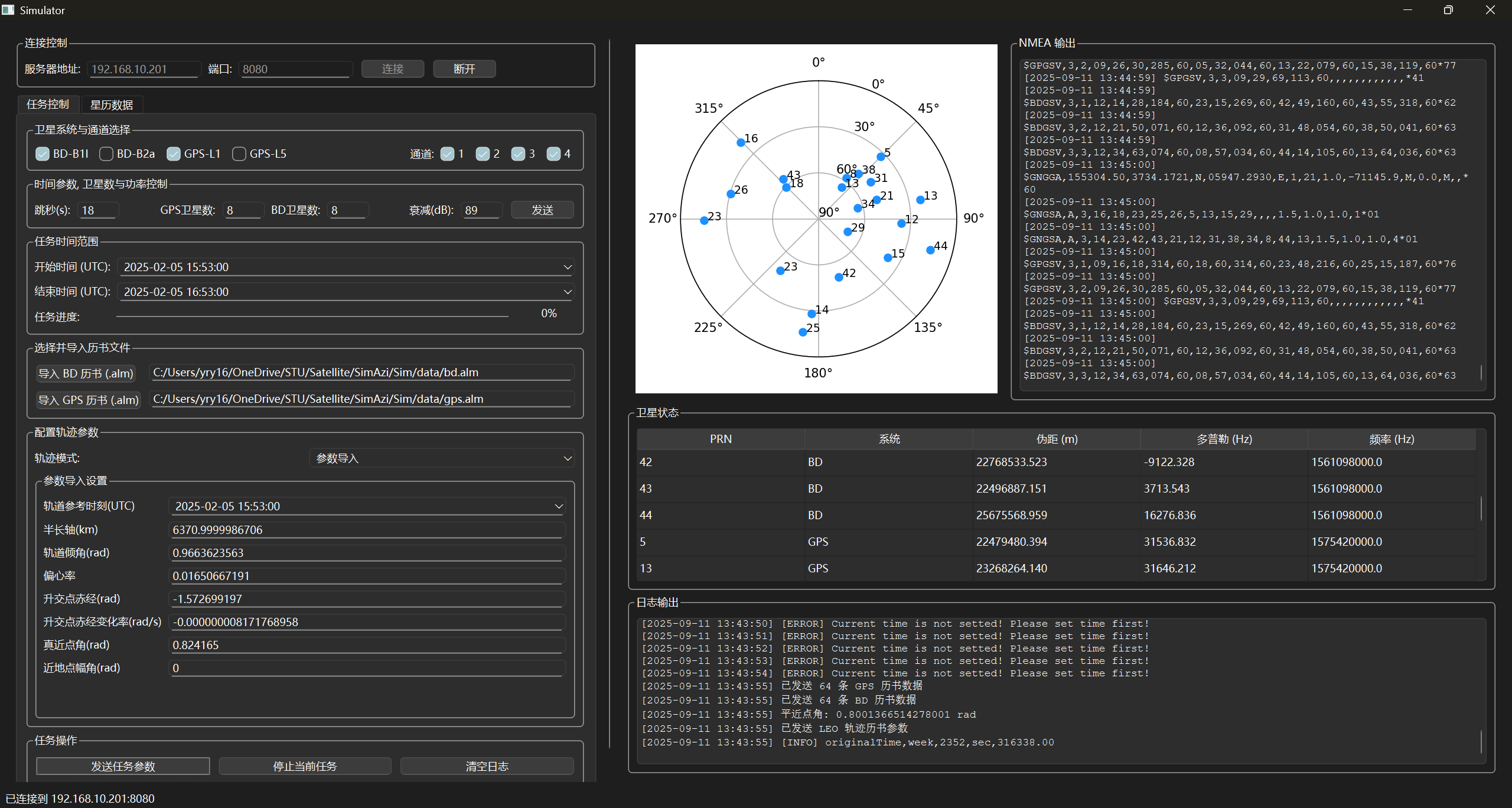
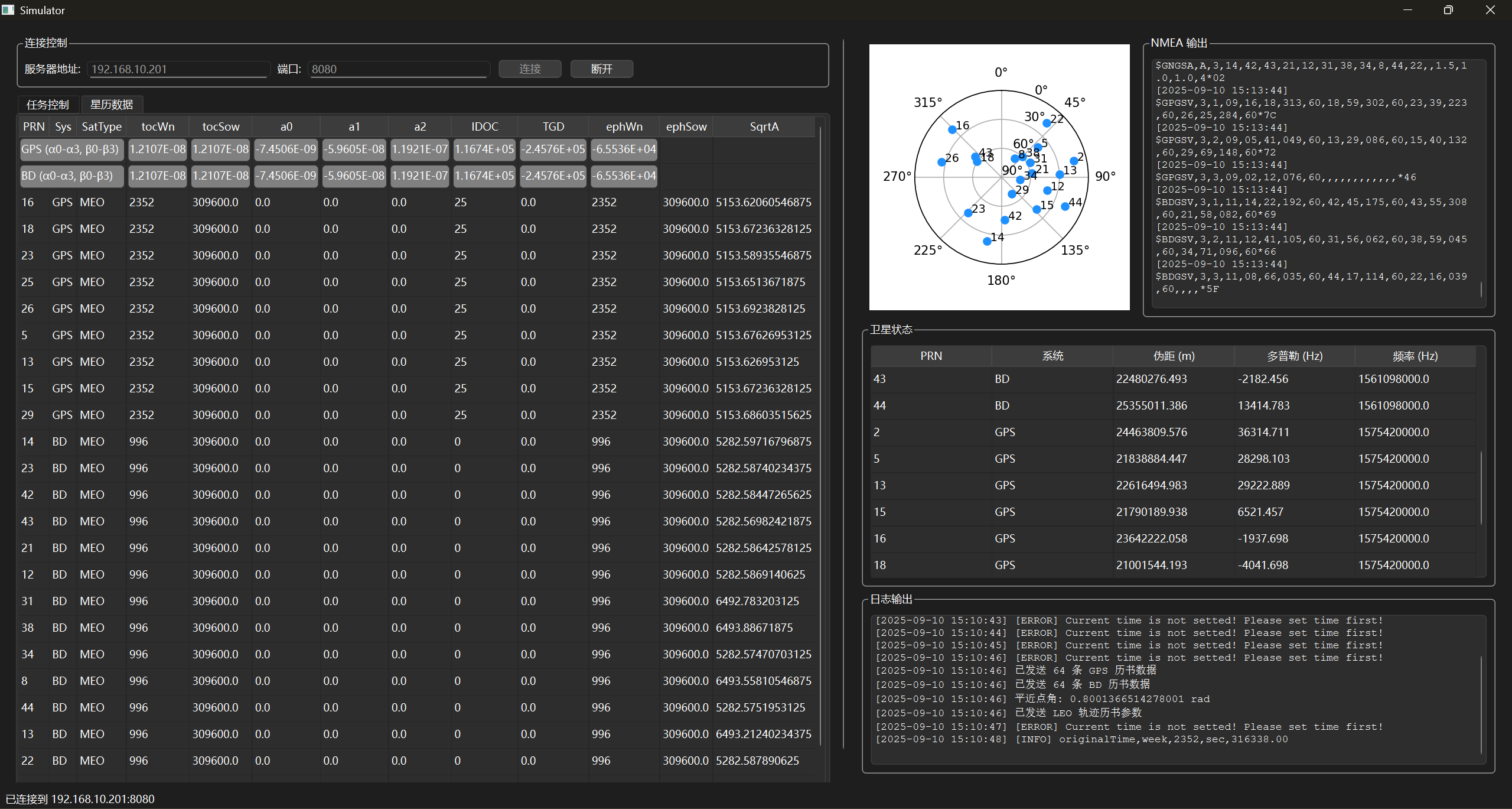
<h2 id="layout">Layout</h2>
<p><img src="/images/intern/azimuth/layout.png" alt="layout" /></p>

<h2 id="ephemeris-table">Ephemeris Table</h2>
<p><img src="/images/intern/azimuth/ephemeris.png" alt="ephemeris" /></p>]]></content><author><name>Renyi Yang</name><email>renyi.yang@grenoble-inp.org</email></author><category term="Internship" /><category term="LAN based" /><category term="Client" /><category term="Python" /><summary type="html"><![CDATA[A LAN-based Simulator Client implemented in Python, designed to show GNSS data with a live ephemeris table and set the parameters for the simulation.]]></summary></entry><entry><title type="html">GNSS Client</title><link href="https://aristurtlehu.github.io/posts/GNSS-Client/" rel="alternate" type="text/html" title="GNSS Client" /><published>2025-07-01T00:00:00+00:00</published><updated>2025-07-01T00:00:00+00:00</updated><id>https://aristurtlehu.github.io/posts/Gnss-Client</id><content type="html" xml:base="https://aristurtlehu.github.io/posts/GNSS-Client/"><![CDATA[<p>A GNSS Client implemented in Python, designed to visualize NMEA 0183 and RTCM 3.3 messages in a dashboard, with support for multiple COM ports.</p>

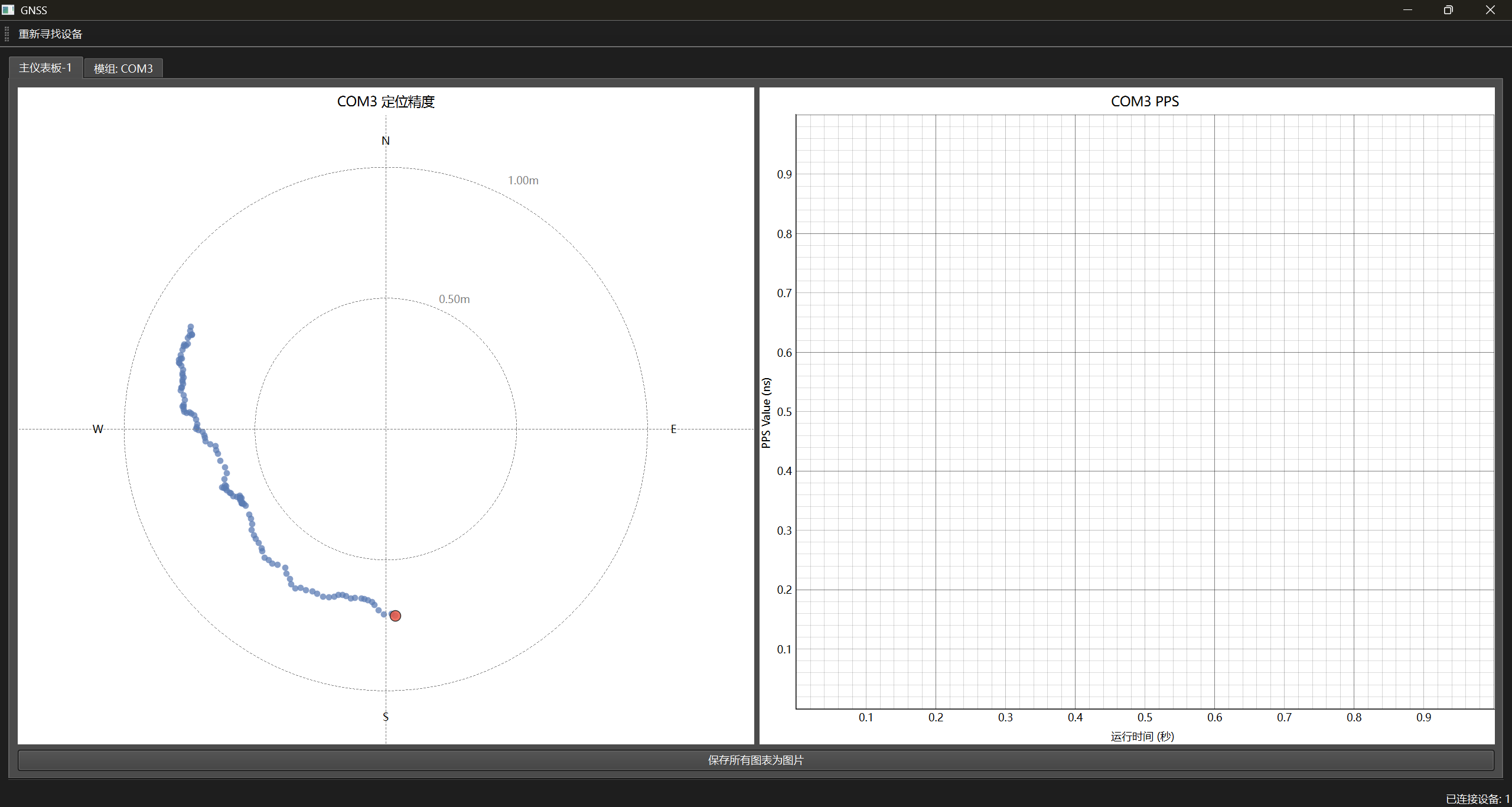
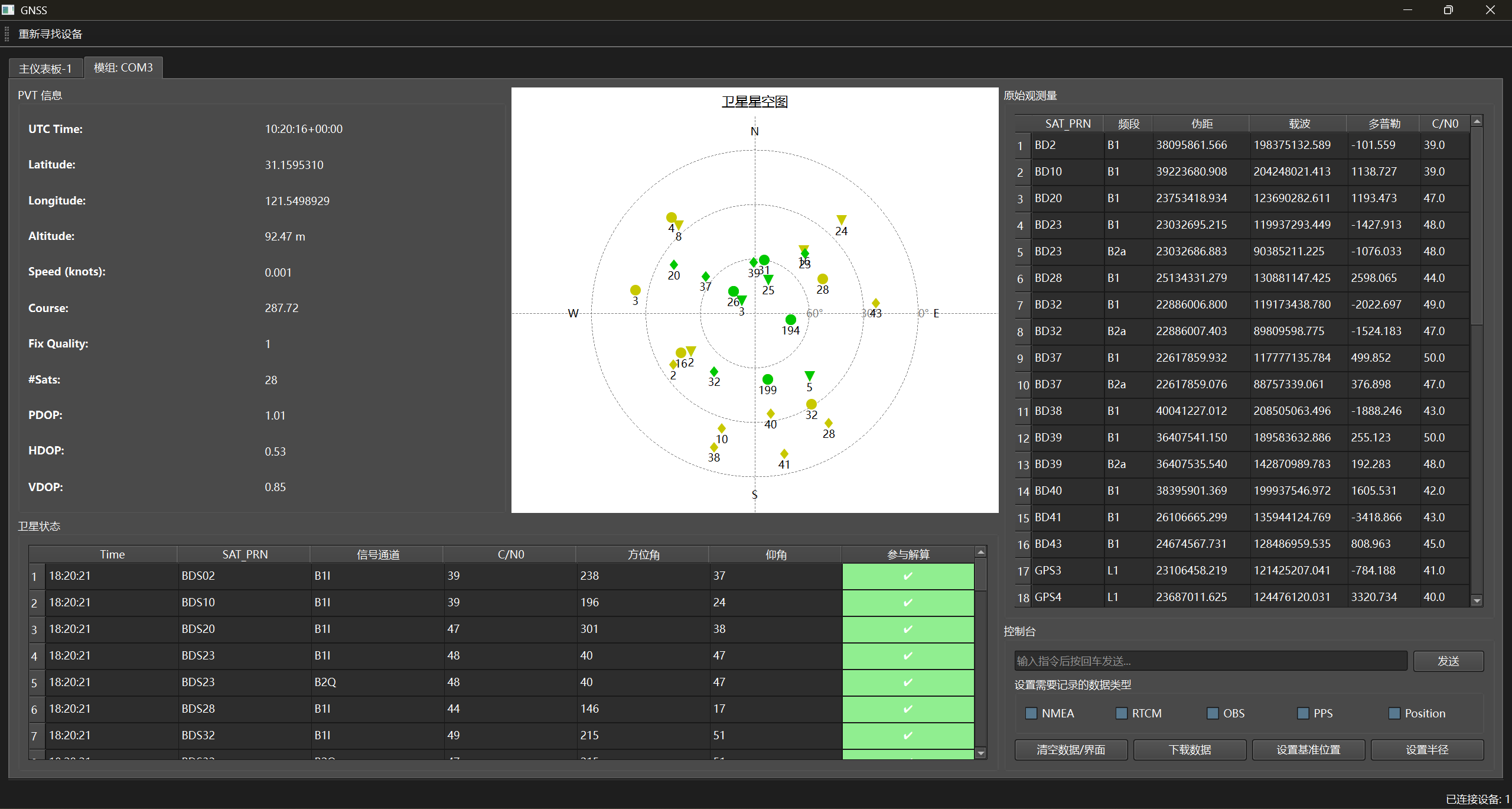
<h2 id="dashboard">Dashboard</h2>
<p><img src="/images/intern/azimuth/dashboard.png" alt="dashboard" /></p>

<h2 id="details-for-each-com">Details for each COM</h2>
<p><img src="/images/intern/azimuth/detail.png" alt="detail" /></p>]]></content><author><name>Renyi Yang</name><email>renyi.yang@grenoble-inp.org</email></author><category term="Internship" /><category term="GNSS" /><category term="multi-COM" /><category term="RTCM 3.3" /><category term="NMEA 0183" /><category term="Python" /><summary type="html"><![CDATA[A GNSS Client implemented in Python, designed to visualize NMEA 0183 and RTCM 3.3 messages in a dashboard, with support for multiple COM ports.]]></summary></entry><entry><title type="html">Fracture-Fixation-FEA-Simulation</title><link href="https://aristurtlehu.github.io/posts/Fracture-Fixation-FEA-Simulation/" rel="alternate" type="text/html" title="Fracture-Fixation-FEA-Simulation" /><published>2025-06-12T00:00:00+00:00</published><updated>2025-06-12T00:00:00+00:00</updated><id>https://aristurtlehu.github.io/posts/Fracture-Fixation-FEA-Simulation</id><content type="html" xml:base="https://aristurtlehu.github.io/posts/Fracture-Fixation-FEA-Simulation/"><![CDATA[<p>A comprehensive finite element analysis (FEA) toolkit for investigating the biomechanical behavior of bone-fixator systems during fracture healing.</p>

<p>This project models stress transfer mechanisms and analyzes how different fixator stiffnesses influence the healing process through computational simulation.</p>

<h2 id="-project-overview">🎯 Project Overview</h2>

<p>This project leverages 2D finite element analysis to explore the critical biomechanical phenomenon of “stress transfer” during the bone fracture healing process. The simulation models:</p>

<ul>
  <li><strong>A Bone-Fixator System:</strong> Incorporating time-dependent callus maturation to simulate the healing progression.</li>
  <li><strong>Stress Redistribution:</strong> Analyzing how mechanical stresses are distributed among the bone, fixator, and developing callus tissues.</li>
  <li><strong>Fracture Gap Strain Evolution:</strong> Tracking changes in strain within the fracture gap under various fixator rigidities.</li>
  <li><strong>Parametric Studies:</strong> Conducting comparative analyses using flexible, standard, and rigid fixator configurations.</li>
</ul>

<h2 id="️-project-structure">🏗️ Project Structure</h2>

<p>The project is organized as follows:</p>

<pre><code class="language-txt">.
├── main.py                      # Main script to run simulations and generate results
├── README.md                    # This README file
├── utils/                       # Directory for core simulation modules
│   ├── fea_core.py              # Core finite element analysis logic
│   ├── materials.py             # Definitions of material properties
│   ├── simulation.py            # Simulation workflow and control
│   ├── analysis.py              # Post-processing: stress and strain calculations
│   └── plot_utils.py            # Utilities for generating plots and visualizations
├── output_advanced/             # Default directory for generated simulation results
│   ├── Flexible/                # Results for the flexible fixator
│   ├── Standard/                # Results for the standard fixator
│   └── Rigid/                   # Results for the rigid fixator
├── assets/                      # Contains model structure figure and generated animations
└── report/                      # LaTeX source documentation
</code></pre>

<h2 id="-quick-start">🚀 Quick Start</h2>

<h3 id="prerequisites">Prerequisites</h3>

<p>Ensure you have Python 3 installed. Then, install the necessary libraries:</p>

<div class="language-bash highlighter-rouge"><div class="highlight"><pre class="highlight"><code>pip <span class="nb">install </span>numpy matplotlib scipy pandas
</code></pre></div></div>

<h3 id="running-the-simulation">Running the Simulation</h3>

<p>Execute the main script from the project’s root directory:</p>

<div class="language-bash highlighter-rouge"><div class="highlight"><pre class="highlight"><code>python main.py
</code></pre></div></div>

<h2 id="-key-features">📊 Key Features</h2>

<h3 id="1-material-modeling">1. Material Modeling</h3>

<p>The simulation incorporates distinct material properties:</p>
<ul>
  <li><strong>Bone:</strong> Modeled as an elastic material with an Elastic Modulus of 18 GPa and a Poisson’s ratio of 0.3.</li>
  <li><strong>Callus:</strong> Simulates the healing process with a time-dependent stiffening behavior, where its Elastic Modulus gradually increases from an initial 0.1 GPa up to 18 GPa, matching mature bone.</li>
  <li><strong>Fixator:</strong> Subject to parametric study with three configurations based on Elastic Modulus:
    <ul>
      <li><strong>Flexible Fixator:</strong> 35 GPa (35.0e9 Pa)</li>
      <li><strong>Standard Fixator:</strong> 70 GPa (70.0e9 Pa)</li>
      <li><strong>Rigid Fixator:</strong> 140 GPa (140.0e9 Pa)</li>
    </ul>
  </li>
</ul>

<h3 id="2-finite-element-analysis">2. Finite Element Analysis</h3>

<ul>
  <li><strong>Methodology:</strong> Employs 2D plane stress analysis.</li>
  <li><strong>Elements:</strong> Utilizes 4-node quadrilateral elements for meshing the domain.</li>
  <li><strong>Meshing:</strong> Features adaptive mesh generation with configurable resolution to balance accuracy and computational cost.</li>
  <li><strong>Simulation Steps:</strong> A time-stepping simulation (default: 20 steps) models the progression of fracture healing and callus maturation.</li>
</ul>

<h3 id="3-analysis-metrics">3. Analysis Metrics</h3>

<p>The simulation tracks and calculates several key biomechanical indicators:</p>
<ul>
  <li><strong>Von Mises Stress:</strong> Distribution across all material regions (bone, callus, fixator).</li>
  <li><strong>Average Stress:</strong> Mean stress values calculated for bone, callus, and fixator components.</li>
  <li><strong>Fracture Gap Strain:</strong> Evolution of strain within the fracture gap over the healing period.</li>
  <li><strong>Stress Shielding Effect:</strong> Quantified by comparing stress levels in the bone under different fixator stiffnesses.</li>
</ul>

<h3 id="4-visualization">4. Visualization</h3>

<p>Comprehensive visualization tools are integrated to aid in the interpretation of results:</p>
<ul>
  <li><strong>Stress Contour Plots:</strong> Generated for each time step, illustrating stress distribution.</li>
  <li><strong>Comparative Stress Evolution Graphs:</strong> Plotting average stress in different components over time for each fixator type.</li>
  <li><strong>Gap Strain Progression Charts:</strong> Showing how fracture gap strain changes throughout the healing simulation.</li>
  <li><strong>Parametric Comparison Visualizations:</strong> Side-by-side plots for easy comparison of outcomes from different fixator stiffnesses.</li>
</ul>

<h2 id="-output-files">📈 Output Files</h2>

<p>Upon successful execution, <code class="language-plaintext highlighter-rouge">main.py</code> generates the following in the <code class="language-plaintext highlighter-rouge">output_advanced/</code> directory:</p>

<ul>
  <li><strong><code class="language-plaintext highlighter-rouge">summary_final_results.csv</code></strong>: A CSV file summarizing the final average Von Mises stress in the fixator, bone, and callus, along with the final fracture gap strain for each fixator type.</li>
  <li><strong><code class="language-plaintext highlighter-rouge">parametric_comparison.png</code></strong>: An image file providing a side-by-side visual comparison of key results across all simulated fixator types.</li>
  <li><strong>Individual Simulation Folders (<code class="language-plaintext highlighter-rouge">Flexible/</code>, <code class="language-plaintext highlighter-rouge">Standard/</code>, <code class="language-plaintext highlighter-rouge">Rigid/</code>)</strong>:
    <ul>
      <li><code class="language-plaintext highlighter-rouge">simulation_results.csv</code>: Time-series data for average stresses and gap strain for that specific simulation run.</li>
      <li><code class="language-plaintext highlighter-rouge">stress_shielding.png</code>: A plot showing the evolution of average stress in bone, callus, and fixator over time.</li>
      <li><code class="language-plaintext highlighter-rouge">gap_strain.png</code>: A plot illustrating the evolution of fracture gap strain over time.</li>
      <li><code class="language-plaintext highlighter-rouge">stress_images/</code>: A directory containing individual frames of stress contour plots, which can be compiled into an animation.</li>
    </ul>
  </li>
</ul>

<h2 id="-results-interpretation">🔬 Results Interpretation</h2>

<p>The simulation outputs provide insights into:</p>

<h3 id="stress-shielding-analysis">Stress Shielding Analysis</h3>

<ul>
  <li><strong>High Fixator Stiffness (Rigid Fixator):</strong> Tends to bear a larger portion of the mechanical load, leading to increased stress within the fixator itself and potentially reducing the mechanical stimulus (stress) experienced by the bone. This is known as stress shielding.</li>
  <li><strong>Low Fixator Stiffness (Flexible Fixator):</strong> Allows for more load sharing with the bone and callus, resulting in a more uniform stress distribution. This can promote better bone loading, which is often considered beneficial for healing.</li>
</ul>

<h3 id="gap-strain-evolution">Gap Strain Evolution</h3>

<ul>
  <li><strong>Initial Phase:</strong> The fracture gap typically experiences high strain levels at the beginning of the healing process when the callus is soft.</li>
  <li><strong>Healing Progression:</strong> As the callus matures and stiffens, the strain in the fracture gap gradually reduces.</li>
  <li><strong>Final Strain Levels:</strong> The magnitude of strain at the end of the simulation can be an indicator of the mechanical stability achieved and potentially correlates with healing success. Interfragmentary strain theory suggests optimal ranges of strain for different stages of healing.</li>
</ul>

<h2 id="-documentation">📚 Documentation</h2>

<p>Detailed technical documentation, theoretical background, and in-depth analysis of results are available in the <a href="https://github.com/XiongWenye/Fracture-Fixation-FEA-Simulation/tree/master/report">report/</a> directory, typically as a LaTeX-generated PDF document.</p>]]></content><author><name>Renyi Yang</name><email>renyi.yang@grenoble-inp.org</email></author><category term="Computational Science and Engineering" /><category term="Finite Element Analysis" /><category term="Biomechanics" /><category term="Python" /><summary type="html"><![CDATA[A comprehensive finite element analysis (FEA) toolkit for investigating the biomechanical behavior of bone-fixator systems during fracture healing.]]></summary></entry><entry><title type="html">Deep-learning-Cardiac-Cine-MRI-Segmentation</title><link href="https://aristurtlehu.github.io/posts/Deep-learning-Cardiac-Cine-MRI-Segmentation/" rel="alternate" type="text/html" title="Deep-learning-Cardiac-Cine-MRI-Segmentation" /><published>2025-06-01T00:00:00+00:00</published><updated>2025-06-01T00:00:00+00:00</updated><id>https://aristurtlehu.github.io/posts/Deep-learning-Cardiac-Cine-MRI-Segmentation</id><content type="html" xml:base="https://aristurtlehu.github.io/posts/Deep-learning-Cardiac-Cine-MRI-Segmentation/"><![CDATA[<p>Cardiac Cine MRI Segmentation</p>

<h2 id="overview">Overview</h2>

<ul>
  <li><strong>Goal:</strong> Segment key cardiac structures – RV, MYO, and LV.</li>
  <li><strong>Challenge:</strong> Accurate and robust delineation of these structures, which can vary in shape and appearance.</li>
  <li><strong>Approach:</strong> U-Net based deep learning framework.
    <ol>
      <li>Baseline U-Net implementation.</li>
      <li>Impact of removing U-Net skip connections.</li>
      <li>Effect of data augmentation.</li>
      <li>Comparison of Binary Cross-Entropy vs. Soft Dice Loss.</li>
      <li>Improvements with Attention and Hybrid Loss.</li>
    </ol>
  </li>
  <li><strong>Evaluation:</strong> Dice Similarity Coefficient (DSC).</li>
</ul>

<h2 id="task-a-u-net-baseline">Task (a): U-Net (Baseline)</h2>

<div align="center">
  <img src="/images/bme/cine/result/network.png" alt="Network" />
</div>

<h3 id="baseline-training-loss-and-validation-loss">Baseline Training Loss and Validation Loss</h3>

<div align="center">
  <img src="/images/bme/cine/result/baseline_unet.png" alt="Baseline Loss" />
</div>

<h3 id="results-dice-coefficients">Results: Dice Coefficients</h3>

<table>
  <thead>
    <tr>
      <th style="text-align: left">Structure</th>
      <th style="text-align: left">Mean Dice</th>
      <th style="text-align: left">Std. Dev.</th>
    </tr>
  </thead>
  <tbody>
    <tr>
      <td style="text-align: left">LV</td>
      <td style="text-align: left">0.9519</td>
      <td style="text-align: left">0.0086</td>
    </tr>
    <tr>
      <td style="text-align: left">MYO</td>
      <td style="text-align: left">0.8734</td>
      <td style="text-align: left">0.0161</td>
    </tr>
    <tr>
      <td style="text-align: left">RV</td>
      <td style="text-align: left">0.8920</td>
      <td style="text-align: left">0.0310</td>
    </tr>
  </tbody>
</table>

<h3 id="segmentation-examples">Segmentation Examples</h3>

<div align="center">
  <img src="/images/bme/cine/result/for_ppt/baseline_RV.png" alt="Baseline Segmentation Example RV" width="700" />
  <figcaption><em>Baseline Segmentation Example RV</em></figcaption>
</div>
<p><br /></p>
<div align="center">
  <img src="/images/bme/cine/result/for_ppt/baseline_MYO.png" alt="Baseline Segmentation Example MYO" width="700" />
  <figcaption><em>Baseline Segmentation Example MYO</em></figcaption>
</div>
<p><br /></p>
<div align="center">
  <img src="/images/bme/cine/result/for_ppt/baseline_LV.png" alt="Baseline Segmentation Example LV" width="700" />
  <figcaption><em>Baseline Segmentation Example LV</em></figcaption>
</div>

<h3 id="discussion---baseline">Discussion - Baseline</h3>

<ul>
  <li><strong>LV Segmentation</strong>: Achieved the highest mean Dice score. This is often expected as the LV is typically a large, relatively well-defined structure with good contrast against surrounding tissues in many MRI sequences.</li>
  <li><strong>RV Segmentation</strong>: Also showed good performance. The RV cavity is usually clearly visible.</li>
  <li><strong>MYO Segmentation</strong>: Had the lowest mean Dice score. The myocardium is a thinner, more complex structure surrounding the RV, and its boundaries, especially with the RV cavity (endocardium) and epicardium, can be more challenging to delineate accurately, potentially leading to lower overlap scores.</li>
  <li>The standard deviations are relatively small, indicating consistent performance across the test slices.</li>
</ul>

<h2 id="task-b-u-net-without-skip-connections">Task (b): U-Net without Skip Connections</h2>

<ul>
  <li><strong>Modification:</strong> No skip connections in the U-Net architecture.</li>
  <li><strong>Training:</strong> Same as baseline (BCE Loss, lr=0.01, 50 epochs).</li>
  <li><strong>Purpose:</strong> Evaluate the importance of skip connections.</li>
</ul>

<h3 id="training-loss-and-validation-loss-no-skip-connections">Training Loss and Validation Loss (No Skip Connections)</h3>

<div align="center">
  <img src="/images/bme/cine/result/no_shortcut_unet.png" alt="Loss Curve for Baseline without shortcut" style="width:70%;" />
  <figcaption><em>Training and Validation Loss for Baseline U-Net without skip connections.</em></figcaption>
</div>

<h3 id="results-dice-coefficients-1">Results: Dice Coefficients</h3>

<table>
  <thead>
    <tr>
      <th style="text-align: left">Structure</th>
      <th style="text-align: left">Baseline DSC</th>
      <th style="text-align: left">No Shortcut DSC</th>
    </tr>
  </thead>
  <tbody>
    <tr>
      <td style="text-align: left">LV Mean</td>
      <td style="text-align: left"><strong>0.9519</strong></td>
      <td style="text-align: left">0.9260</td>
    </tr>
    <tr>
      <td style="text-align: left">MYO Mean</td>
      <td style="text-align: left"><strong>0.8734</strong></td>
      <td style="text-align: left">0.8223</td>
    </tr>
    <tr>
      <td style="text-align: left">RV Mean</td>
      <td style="text-align: left"><strong>0.8920</strong></td>
      <td style="text-align: left">0.8588</td>
    </tr>
    <tr>
      <td style="text-align: left">LV std</td>
      <td style="text-align: left">0.0086</td>
      <td style="text-align: left">0.0111</td>
    </tr>
    <tr>
      <td style="text-align: left">MYO std</td>
      <td style="text-align: left">0.0161</td>
      <td style="text-align: left">0.0168</td>
    </tr>
    <tr>
      <td style="text-align: left">RV std</td>
      <td style="text-align: left">0.0310</td>
      <td style="text-align: left">0.0296</td>
    </tr>
  </tbody>
</table>

<h3 id="discussion---impact-of-no-skip-connections">Discussion - Impact of No Skip Connections</h3>

<ul>
  <li><strong>Significant Drop in Performance:</strong> All structures showed a noticeable decrease in DSC.</li>
  <li><strong>Reason:</strong> Skip connections provide high-resolution spatial information from the encoder to the decoder, crucial for accurate boundary localization. They also aid gradient flow.</li>
  <li><strong>Conclusion:</strong> Skip connections are vital for U-Net’s segmentation accuracy in this task.</li>
</ul>

<h2 id="task-c-u-net-with-data-augmentation">Task (c): U-Net with Data Augmentation</h2>

<ul>
  <li><strong>Network:</strong> Baseline U-Net architecture.</li>
  <li><strong>Augmentations (Training Set Only):</strong></li>
  <li><code class="language-plaintext highlighter-rouge">RandomHorizontalFlip</code></li>
  <li><code class="language-plaintext highlighter-rouge">RandomRotation(15°)</code></li>
  <li><code class="language-plaintext highlighter-rouge">RandomAffine(degrees=50, translate=(0.1,0.1), scale=(0.9,1.1), shear=5)</code></li>
  <li><strong>Implementation:</strong> <code class="language-plaintext highlighter-rouge">SegmentationDataset</code> ensuring identical transforms for image and mask.</li>
  <li><strong>Training:</strong> BCE Loss, lr=0.01, 50 epochs.</li>
</ul>

<h3 id="training-loss-and-validation-loss-with-data-augmentation">Training Loss and Validation Loss (with Data Augmentation)</h3>

<div align="center">
  <img src="/images/bme/cine/result/baseline_unet_data_aug.png" alt="Loss Curve for Baseline with data augmentation" style="width:70%;" />
  <figcaption><em>Training and Validation Loss for Baseline U-Net with Data Augmentation.</em></figcaption>
</div>

<h3 id="results-dice-coefficients-2">Results: Dice Coefficients</h3>

<table>
  <thead>
    <tr>
      <th style="text-align: left">Structure</th>
      <th style="text-align: left">Baseline DSC</th>
      <th style="text-align: left">Data Aug. DSC</th>
    </tr>
  </thead>
  <tbody>
    <tr>
      <td style="text-align: left">LV Mean</td>
      <td style="text-align: left"><strong>0.9519</strong></td>
      <td style="text-align: left">0.9276</td>
    </tr>
    <tr>
      <td style="text-align: left">MYO Mean</td>
      <td style="text-align: left"><strong>0.8734</strong></td>
      <td style="text-align: left">0.8469</td>
    </tr>
    <tr>
      <td style="text-align: left">RV Mean</td>
      <td style="text-align: left"><strong>0.8920</strong></td>
      <td style="text-align: left">0.8635</td>
    </tr>
    <tr>
      <td style="text-align: left">LV std</td>
      <td style="text-align: left">0.0086</td>
      <td style="text-align: left">0.0107</td>
    </tr>
    <tr>
      <td style="text-align: left">MYO std</td>
      <td style="text-align: left">0.0161</td>
      <td style="text-align: left">0.0149</td>
    </tr>
    <tr>
      <td style="text-align: left">RV std</td>
      <td style="text-align: left">0.0310</td>
      <td style="text-align: left">0.0384</td>
    </tr>
  </tbody>
</table>

<h3 id="discussion---impact-of-data-augmentation">Discussion - Impact of Data Augmentation</h3>

<ul>
  <li><strong>DSC Decrease:</strong> The specific augmentation strategy led to slightly lower Dice scores.</li>
  <li><strong>Possible Reasons:</strong></li>
  <li>Some augmentations could have distorted anatomical structures, reducing the effectiveness of learning precise boundaries. Maybe the relative location of structures was altered too much.</li>
  <li><strong>Conclusion:</strong> The relative location of structures is crucial for segmentation tasks, and the specific augmentations used may not have been beneficial for this dataset. More careful selection or tuning of augmentations is needed.</li>
</ul>

<h2 id="task-d-u-net-with-soft-dice-loss">Task (d): U-Net with Soft Dice Loss</h2>

<ul>
  <li><strong>Network:</strong> Baseline U-Net architecture.</li>
  <li><strong>Training Data:</strong> Original Non-Augmented Training Set.</li>
  <li><strong>Loss Function:</strong> <code class="language-plaintext highlighter-rouge">SoftDiceLoss</code>.</li>
  <li><strong>Optimizer:</strong> Adam (lr=0.001), ExponentialLR scheduler.</li>
  <li><strong>Training:</strong> 50 epochs.</li>
</ul>

<h3 id="training-loss-and-validation-loss-with-soft-dice-loss">Training Loss and Validation Loss (With Soft Dice Loss)</h3>

<div align="center">
  <img src="/images/bme/cine/result/soft_dice_loss.png" alt="Loss Curve for Baseline with Soft Dice Loss" style="width:70%;" />
  <figcaption><em>Training and Validation Loss for Baseline U-Net with Soft Dice Loss.</em></figcaption>
</div>

<h3 id="results-dice-coefficients-3">Results: Dice Coefficients</h3>

<table>
  <thead>
    <tr>
      <th style="text-align: left">Structure</th>
      <th style="text-align: left">Baseline with BCE Loss</th>
      <th style="text-align: left">Baseline with Soft Dice Loss</th>
    </tr>
  </thead>
  <tbody>
    <tr>
      <td style="text-align: left">LV Mean</td>
      <td style="text-align: left">0.9519</td>
      <td style="text-align: left"><strong>0.9566</strong></td>
    </tr>
    <tr>
      <td style="text-align: left">MYO Mean</td>
      <td style="text-align: left">0.8734</td>
      <td style="text-align: left"><strong>0.8962</strong></td>
    </tr>
    <tr>
      <td style="text-align: left">RV Mean</td>
      <td style="text-align: left">0.8920</td>
      <td style="text-align: left"><strong>0.8998</strong></td>
    </tr>
    <tr>
      <td style="text-align: left">LV std</td>
      <td style="text-align: left">0.0086</td>
      <td style="text-align: left">0.0100</td>
    </tr>
    <tr>
      <td style="text-align: left">MYO std</td>
      <td style="text-align: left">0.0161</td>
      <td style="text-align: left">0.0100</td>
    </tr>
    <tr>
      <td style="text-align: left">RV std</td>
      <td style="text-align: left">0.0310</td>
      <td style="text-align: left">0.0371</td>
    </tr>
  </tbody>
</table>

<h3 id="results-accuracy">Results: Accuracy</h3>

<table>
  <thead>
    <tr>
      <th style="text-align: left">Structure</th>
      <th style="text-align: left">Baseline with BCE Loss</th>
      <th style="text-align: left">Baseline with Soft Dice Loss</th>
    </tr>
  </thead>
  <tbody>
    <tr>
      <td style="text-align: left">LV Accuracy Mean</td>
      <td style="text-align: left">0.9991</td>
      <td style="text-align: left"><strong>0.9992</strong></td>
    </tr>
    <tr>
      <td style="text-align: left">MYO Accuracy Mean</td>
      <td style="text-align: left">0.9977</td>
      <td style="text-align: left"><strong>0.9980</strong></td>
    </tr>
    <tr>
      <td style="text-align: left">RV Accuracy Mean</td>
      <td style="text-align: left">0.9983</td>
      <td style="text-align: left">0.9983</td>
    </tr>
    <tr>
      <td style="text-align: left">LV Accuracy std</td>
      <td style="text-align: left">0.0002</td>
      <td style="text-align: left">0.0002</td>
    </tr>
    <tr>
      <td style="text-align: left">MYO Accuracy std</td>
      <td style="text-align: left">0.0003</td>
      <td style="text-align: left">0.0002</td>
    </tr>
    <tr>
      <td style="text-align: left">RV Accuracy std</td>
      <td style="text-align: left">0.0005</td>
      <td style="text-align: left">0.0006</td>
    </tr>
  </tbody>
</table>

<h3 id="segmentation-examples-soft-dice-loss">Segmentation Examples (Soft Dice Loss)</h3>

<div align="center">
  <img src="/images/bme/cine/result/for_ppt/soft_dice_loss_RV.png" alt="Baseline with Soft Dice Loss Segmentation Example RV" width="700" />
  <figcaption><em>Baseline with Soft Dice Loss Segmentation Example RV</em></figcaption>
</div>
<p><br /></p>
<div align="center">
  <img src="/images/bme/cine/result/for_ppt/soft_dice_loss_MYO.png" alt="Baseline with Soft Dice Loss Segmentation Example MYO" width="700" />
  <figcaption><em>Baseline with Soft Dice Loss Segmentation Example MYO</em></figcaption>
</div>
<p><br /></p>
<div align="center">
  <img src="/images/bme/cine/result/for_ppt/soft_dice_loss_LV.png" alt="Baseline with Soft Dice Loss Segmentation Example LV" width="700" />
  <figcaption><em>Baseline with Soft Dice Loss Segmentation Example LV</em></figcaption>
</div>

<h3 id="discussion---soft-dice-loss">Discussion - Soft Dice Loss</h3>

<ul>
  <li><strong>Segmentation Accuracy (Dice):</strong> Using Soft Dice Loss resulted in <strong>noticeably better Dice coefficients</strong> for all cardiac structures compared to BCE Loss when trained on the same non-augmented data. The improvement for MYO was particularly significant.</li>
  <li><strong>Segmentation Accuracy (Pixel-wise):</strong> Pixel-wise accuracy also showed slight improvements or remained comparable at very high levels.</li>
  <li><strong>Conclusion for Task (d):</strong> Changing the training loss from cross-entropy (BCE) to Soft Dice Loss <strong>improved overall segmentation accuracy</strong>, especially when evaluated by the Dice coefficient, which is more sensitive to segmentation overlap.</li>
</ul>

<h2 id="task-e-improvements">Task (e): Improvements</h2>

<p>This section explores two main improvements: using an Attention U-Net and employing a Hybrid Loss function.</p>

<h3 id="attention-u-net">Attention U-Net</h3>

<ul>
  <li><strong>Advanced UNet (Attention U-Net):</strong></li>
  <li><strong>Architecture:</strong> Introduced <code class="language-plaintext highlighter-rouge">AttentionBlock</code> in the decoder’s <code class="language-plaintext highlighter-rouge">Up</code> module.
    *   <code class="language-plaintext highlighter-rouge">AttentionBlock</code>: Computes attention coefficients by combining features from the decoder (gating signal) and encoder (skip connection), then applies these coefficients to the encoder features. This helps the model focus on relevant spatial regions during upsampling.</li>
  <li><strong>Loss Function:</strong> <code class="language-plaintext highlighter-rouge">BCE Loss</code>.</li>
  <li><strong>Optimizer:</strong> Adam (lr=0.001), ExponentialLR scheduler.</li>
  <li><strong>Training:</strong> 50 epochs.</li>
</ul>

<h4 id="attention-u-net-architecture-diagram">Attention U-Net Architecture Diagram</h4>
<div align="center">
  <img src="/images/bme/cine/result/for_ppt/attention_unet.png" alt="Attention U-Net Architecture" width="700" />
  <figcaption><em>Attention U-Net Architecture</em></figcaption>
</div>

<h4 id="results-dice-coefficients-attention-u-net">Results: Dice Coefficients (Attention U-Net)</h4>

<table>
  <thead>
    <tr>
      <th style="text-align: left">Structure</th>
      <th style="text-align: left">Baseline with BCE Loss</th>
      <th style="text-align: left">Baseline with Soft Dice Loss</th>
      <th style="text-align: left">Attention U-Net</th>
    </tr>
  </thead>
  <tbody>
    <tr>
      <td style="text-align: left">LV Mean</td>
      <td style="text-align: left">0.9519</td>
      <td style="text-align: left">0.9566</td>
      <td style="text-align: left"><strong>0.9568</strong></td>
    </tr>
    <tr>
      <td style="text-align: left">MYO Mean</td>
      <td style="text-align: left">0.8734</td>
      <td style="text-align: left">0.8962</td>
      <td style="text-align: left"><strong>0.8963</strong></td>
    </tr>
    <tr>
      <td style="text-align: left">RV Mean</td>
      <td style="text-align: left">0.8920</td>
      <td style="text-align: left">0.8998</td>
      <td style="text-align: left"><strong>0.9029</strong></td>
    </tr>
    <tr>
      <td style="text-align: left">LV std</td>
      <td style="text-align: left">0.0086</td>
      <td style="text-align: left">0.0100</td>
      <td style="text-align: left">0.0095</td>
    </tr>
    <tr>
      <td style="text-align: left">MYO std</td>
      <td style="text-align: left">0.0161</td>
      <td style="text-align: left">0.0100</td>
      <td style="text-align: left">0.0120</td>
    </tr>
    <tr>
      <td style="text-align: left">RV std</td>
      <td style="text-align: left">0.0310</td>
      <td style="text-align: left">0.0371</td>
      <td style="text-align: left">0.0370</td>
    </tr>
  </tbody>
</table>

<h4 id="segmentation-examples-attention-u-net">Segmentation Examples (Attention U-Net)</h4>

<div align="center">
  <img src="/images/bme/cine/result/for_ppt/attention_RV.png" alt="Attention U-Net Segmentation Example RV" width="700" />
  <figcaption><em>Attention U-Net Segmentation Example RV</em></figcaption>
</div>
<p><br /></p>
<div align="center">
  <img src="/images/bme/cine/result/for_ppt/attention_MYO.png" alt="Attention U-Net Segmentation Example MYO" width="700" />
  <figcaption><em>Attention U-Net Segmentation Example MYO</em></figcaption>
</div>
<p><br /></p>
<div align="center">
  <img src="/images/bme/cine/result/for_ppt/attention_LV.png" alt="Attention U-Net Segmentation Example LV" width="700" />
  <figcaption><em>Attention U-Net Segmentation Example LV</em></figcaption>
</div>

<h4 id="discussion---attention-u-net">Discussion - Attention U-Net</h4>

<ul>
  <li>The Attention U-Net showed improved Dice scores compared to the baseline U-Net with BCE loss and the one with Soft Dice Loss. RV performance was slightly higher than the baseline with Soft Dice Loss and the BCE baseline.</li>
  <li>This suggests that the attention mechanism effectively helps the model to focus on more complex structures or finer details, leading to better boundary delineation for certain structures.</li>
  <li>Accuracy scores are very high across all structures, which is common in segmentation tasks with large background areas. Dice coefficient remains a more informative metric for evaluating overlap.</li>
</ul>

<h3 id="hybridloss">HybridLoss</h3>

<p><strong>Motivation:</strong>
To further improve segmentation, especially at boundaries and for complex structures, by combining multiple complementary loss objectives. This aims to leverage the strengths of different loss types for a more holistic optimization.</p>

<h4 id="hybridloss-definition">HybridLoss Definition</h4>
<p>The HybridLoss adaptively weights four distinct loss components:</p>
<ol>
  <li><strong>Dice Loss</strong> (Overlap)</li>
  <li><strong>Binary Cross-Entropy (BCE) Loss</strong> (Pixel-wise accuracy)</li>
  <li><strong>Boundary Loss</strong> (Edge definition)</li>
  <li><strong>Hausdorff Distance Loss (Approximation)</strong> (Shape similarity)
    <ul>
      <li>Features adaptive weighting of these components using learnable uncertainty parameters.</li>
    </ul>
  </li>
</ol>

<h4 id="results-with-hybridloss-mean-dice-scores">Results with HybridLoss (Mean Dice Scores)</h4>

<table>
  <thead>
    <tr>
      <th style="text-align: left">Model</th>
      <th style="text-align: left">LV Dice (SD)</th>
      <th style="text-align: left">MYO Dice (SD)</th>
      <th style="text-align: left">RV Dice (SD)</th>
    </tr>
  </thead>
  <tbody>
    <tr>
      <td style="text-align: left"><strong>UNet + HybridLoss</strong></td>
      <td style="text-align: left">0.9504 (0.0276)</td>
      <td style="text-align: left">0.8839 (0.0275)</td>
      <td style="text-align: left"><strong>0.9061</strong> (0.0573)</td>
    </tr>
    <tr>
      <td style="text-align: left"><em>Baseline U-Net</em></td>
      <td style="text-align: left"><em>0.9519</em></td>
      <td style="text-align: left"><em>0.8734</em></td>
      <td style="text-align: left"><em>0.8920</em></td>
    </tr>
    <tr>
      <td style="text-align: left"><strong>AttUNet + HybridLoss</strong></td>
      <td style="text-align: left">0.9507 (0.0235)</td>
      <td style="text-align: left">0.8875 (0.0247)</td>
      <td style="text-align: left">0.9033 (0.0703)</td>
    </tr>
    <tr>
      <td style="text-align: left"><em>Attention U-Net</em></td>
      <td style="text-align: left"><em>0.9568 (0.0095)</em></td>
      <td style="text-align: left"><em>0.8963 (0.0120)</em></td>
      <td style="text-align: left"><em>0.9029 (0.0370)</em></td>
    </tr>
  </tbody>
</table>

<h2 id="overall-performance-summary-mean-dice-coefficients">Overall Performance Summary (Mean Dice Coefficients)</h2>

<table>
  <thead>
    <tr>
      <th style="text-align: left">Model Configuration</th>
      <th style="text-align: left">LV Mean DSC</th>
      <th style="text-align: left">MYO Mean DSC</th>
      <th style="text-align: left">RV Mean DSC</th>
    </tr>
  </thead>
  <tbody>
    <tr>
      <td style="text-align: left">(a) Baseline U-Net (BCE)</td>
      <td style="text-align: left">0.9519</td>
      <td style="text-align: left">0.8734</td>
      <td style="text-align: left">0.8920</td>
    </tr>
    <tr>
      <td style="text-align: left">(b) U-Net No Shortcut (BCE)</td>
      <td style="text-align: left">0.9260</td>
      <td style="text-align: left">0.8223</td>
      <td style="text-align: left">0.8588</td>
    </tr>
    <tr>
      <td style="text-align: left">(c) U-Net + Data Aug. (BCE)</td>
      <td style="text-align: left">0.9276</td>
      <td style="text-align: left">0.8469</td>
      <td style="text-align: left">0.8635</td>
    </tr>
    <tr>
      <td style="text-align: left">(d) U-Net (Soft Dice Loss, No Aug.)</td>
      <td style="text-align: left">0.9566</td>
      <td style="text-align: left">0.8962</td>
      <td style="text-align: left">0.8998</td>
    </tr>
    <tr>
      <td style="text-align: left">(e0) AttUNet (BCE)</td>
      <td style="text-align: left"><strong>0.9568</strong></td>
      <td style="text-align: left"><strong>0.8963</strong></td>
      <td style="text-align: left">0.9029</td>
    </tr>
    <tr>
      <td style="text-align: left">(e1) UNet + HybridLoss</td>
      <td style="text-align: left">0.9504</td>
      <td style="text-align: left">0.8839</td>
      <td style="text-align: left"><strong>0.9061</strong></td>
    </tr>
    <tr>
      <td style="text-align: left">(e2) AttUNet + HybridLoss</td>
      <td style="text-align: left">0.9507</td>
      <td style="text-align: left">0.8875</td>
      <td style="text-align: left">0.9033</td>
    </tr>
  </tbody>
</table>

<h2 id="overall-discussion">Overall Discussion</h2>

<ul>
  <li>The <strong>AttUNet with BCE</strong> (e0) remains the top performer for LV and MYO segmentation.</li>
  <li>Models utilizing <strong>UNet + HybridLoss (e1)</strong>, achieved the best RV Dice score.</li>
  <li><strong>No Universal Superiority:</strong> HybridLoss, despite its sophisticated multi-component design with adaptive weighting, did not prove to be a universally superior loss function in these experiments.</li>
  <li><strong>RV Segmentation Strength:</strong> A consistent observation is the relative strength of HybridLoss (or its components) in improving or maintaining high performance for RV segmentation, even when LV/MYO performance drops.</li>
</ul>

<h2 id="conclusion">Conclusion</h2>

<ul>
  <li><strong>Best Overall Performance (Structure-wise):</strong></li>
  <li><strong>LV &amp; MYO:</strong> AttUNet with BCE (Task e, Attention U-Net part; e0 in summary) shows the highest Dice scores.</li>
  <li><strong>RV:</strong> U-Net with HybridLoss (Task e, HybridLoss part; e1 in summary) achieves the best Dice score.</li>
  <li><strong>Complexity vs. Simplicity:</strong> A simpler model (U-Net) with a well-chosen, targeted loss function (Soft Dice Loss) can still be highly effective and may outperform more complex loss formulations on certain structures or metrics.</li>
  <li>The performance of HybridLoss models suggests that further optimization (e.g., training duration, hyperparameter tuning of the loss components or solver) could potentially lead to even better results.</li>
</ul>]]></content><author><name>Renyi Yang</name><email>renyi.yang@grenoble-inp.org</email></author><category term="Computer Vision" /><category term="AI for Healthcare" /><category term="Python" /><summary type="html"><![CDATA[Cardiac Cine MRI Segmentation]]></summary></entry><entry><title type="html">Deep-Learning-Dynamic-MRI-Reconstruction</title><link href="https://aristurtlehu.github.io/posts/Deep-Learning-Dynamic-MRI-Reconstruction/" rel="alternate" type="text/html" title="Deep-Learning-Dynamic-MRI-Reconstruction" /><published>2025-05-01T00:00:00+00:00</published><updated>2025-05-01T00:00:00+00:00</updated><id>https://aristurtlehu.github.io/posts/Deep-Learning-Dynamic-MRI-Reconstruction</id><content type="html" xml:base="https://aristurtlehu.github.io/posts/Deep-Learning-Dynamic-MRI-Reconstruction/"><![CDATA[<p>Dynamic MRI Reconstruction</p>

<div align="center">
    <figure>
        <img src="/images/bme/mri/assets/pipeline.png" alt="Reconstruction Network Architecture" />
            <figcaption><em>Fig: Overall architecture of our proposed reconstruction network with dual UNet branches for real and imaginary components and 3D ResNet for temporal fusion</em></figcaption>
    </figure>
</div>

<p> </p>

<p>This is a repository for the project “Deep Learning for Dynamic MRI Reconstruction” as part of the course BME1312 Artificial Intelligence in Biomedical Imaging at ShanghaiTech University. The project focuses on using deep learning techniques to reconstruct dynamic MRI images from undersampled data.</p>

<p>This project uses deep learning to reconstruct high-quality dynamic MRI images from undersampled data. We propose a deep-learning-based denoising framework combining two independent UNet modules and a 3D ResNet to explore the temporal correlation.
We generate variable density undersampling patterns with acceleration factor 5 and 11 central k-space lines, analyze the resulting aliasing artifacts, and evaluate reconstruction performance with PSNR and SSIM metrics. Additionally, we investigate the effects of dropout, dynamic learning rate schedules and compare L1 versus L2 losses.</p>

<h2 id="to-start">TO START</h2>
<ol>
  <li>Clone the repository and download the dataset from <a href="https://drive.google.com/file/d/1bhTKXgJm4aL1C5ollUoRh1JLarJO9Yxu/view?usp=sharing">here</a></li>
</ol>

<p>Our dataset cine. npz is a fully sampled cardiac cine MR image with the size of [nsamples, nt, nx, ny]
where nsamples is the number of samples, nt is the number of frames, nx and ny are the dimensions of the image.</p>

<ol>
  <li>Install the required packages:
    <div class="language-bash highlighter-rouge"><div class="highlight"><pre class="highlight"><code>pip <span class="nb">install</span> <span class="nt">-r</span> requirements.txt
</code></pre></div>    </div>
  </li>
  <li>Run the training script:
    <div class="language-bash highlighter-rouge"><div class="highlight"><pre class="highlight"><code>python train.py output
</code></pre></div>    </div>
  </li>
</ol>

<p>After that, you can find the undersampled images, reconstructed images in the image folder, and the training log in the output folder. We also provide the full sampling images and both real and imaginary parts of the UNet-reconstructed images in the image folder for reference.</p>

<ol>
  <li>Analyze the results by comparing the reconstructed images with the original images. You can use metrics like PSNR (Peak Signal-to-Noise Ratio) and SSIM (Structural Similarity Index) to evaluate the quality of the reconstructions, both of them are provided in the output.txt file.</li>
</ol>

<h2 id="variable-density-random-undersampling-pattern-generation">Variable Density Random Undersampling Pattern Generation</h2>

<p>We generate a variable density random undersampling pattern (U) with the size of 
the given cine images for acceleration factor of 5. Eleven central k-space lines are sampled 
for each frame. Each sampling pattern must be a matrix with 1s in the sampled positions 
and  0s  in  the  remaining  ones.</p>

<p>We also plot the undersampling mask for one dynamic frame and 
undersampling masks in the ky-t dimension.
<img src="/images/bme/mri/assets/undersampling_mask.png" alt="Undersampling Mask" /></p>

<p>We also obtained the aliased images as a result of the undersampling process with the generated patterns. For this we use the formula:</p>

\[b = F^{-1} \cdot U \cdot F \cdot m\]

<p>where $b$ is the aliased image, $F$ is the Fourier transform, $U$ is the undersampling mask, and $m$ is the original image. The aliased images are then used as input to the deep learning model for reconstruction.</p>

<p>Below are some examples of the aliased images generated from the original images.</p>
<div align="center">
    <div class="figure">
        <img src="/images/bme/mri/under_sampling/under_sampling_1.png" alt="Aliased Image 1" />
    </div>
    <div class="figure">
        <img src="/images/bme/mri/under_sampling/under_sampling_5.png" alt="Aliased Image 2" />
        <p class="caption"><em>Fig: Aliased image resulting from 5x undersampling of the cardiac MRI data</em></p>
    </div>
</div>

<p>And here are the comparison of the aliased images with the original images. We also show the sampling masks for some frames. It is noticeable that different frames have different sampling masks, which is a key feature of our approach to Deep Learning based reconstruction.</p>

<div align="center">
    <div class="figure">
        <img src="/images/bme/mri/assets/comparison_image_0.png" alt="Undersampling Patterns Frame 0" />
    </div>
    <div class="figure">
        <img src="/images/bme/mri/assets/comparison_image_1.png" alt="Undersampling Patterns Frame 1" />
    </div>
    <div class="figure">
        <img src="/images/bme/mri/assets/comparison_image_2.png" alt="Undersampling Patterns Frame 2" />
        <p class="caption"><em>Fig: Comparison between fully sampled (left), undersampled (middle), and corresponding sampling mask (right) for frames</em></p>
    </div>
    <div class="figure">
        <img src="/images/bme/mri/assets/mask.png" alt="Multiple Sampling Masks" />
        <p class="caption"><em>Fig: Multiple sampling masks showing the variable density patterns across different temporal frames</em></p>
    </div>
</div>

<p>It is also clear to see that, for different dynamic frames, the undersampling masks are different.</p>

<h2 id="reconstruction-network">Reconstruction Network</h2>

<p>All the details of the network are in the train.py file.</p>

<p>To explore the temporal correlation, we chose to stack the dynamic images along the channel dimension. However, this brought out a problem as the input image is pseudo-complex, and the real and imaginary parts are not aligned. To solve this, we split the input into two branches, one for the real part and one for the imaginary part. The two branches are then concatenated at the end of the UNet structure. We added attention mechanisms to the bottleneck layer of the UNet structure to better capture the spatial correlation and channel correlation.</p>
<p>However, UNet is a 2D structure, and the temporal correlation is not well captured. 
To solve this, we added a 3D ResNet structure after the UNet structure to better achieve this goal.</p>

<p>So in general, the reconstruction network consists of three components:</p>

<h3 id="dual-2d-unet-architecture-real--imaginary-components">Dual 2D UNet Architecture (Real &amp; Imaginary Components)</h3>
<p>Purpose: Process the real and imaginary parts of the complex MRI data</p>

<p>Features:</p>
<ul>
  <li>Encoder-decoder structure with skip connections</li>
  <li>Attention mechanism in the bottleneck layer</li>
  <li>Dropout (p=0.3) for regularization</li>
  <li>LeakyReLU activation (negative_slope=0.1)</li>
  <li>Weight Regularization for better training stability</li>
  <li>Channel and spatial attention modules</li>
</ul>

<h3 id="3d-resnet-temporal-fusion">3D ResNet (Temporal Fusion)</h3>
<p>Purpose: Integrate temporal information across the MRI sequence</p>

<p>Features:</p>
<ul>
  <li>3D convolutions to process the temporal dimension</li>
  <li>Residual connections for better gradient flow</li>
  <li>Lightweight design with one residual block per layer</li>
  <li>Final 1×1×1 convolution to map features to output channels</li>
</ul>

<p>The whole structure is shown in the figure below.</p>
<div align="center">
    <div class="figure">
        <img src="/images/bme/mri/assets/pipeline.png" alt="Reconstruction Network" />
        <p class="caption"><em>Fig: Detailed architecture of our reconstruction network showing dual UNet branches for processing real and imaginary components separately, followed by a 3D ResNet for temporal fusion across frames</em></p>
    </div>
</div>

<h3 id="training-and-evaluation">Training and Evaluation</h3>
<p>Below are the details of the training parameters:</p>
<div class="language-python highlighter-rouge"><div class="highlight"><pre class="highlight"><code><span class="n">train</span><span class="p">(</span><span class="n">in_channels</span><span class="o">=</span><span class="mi">20</span><span class="p">,</span>
      <span class="n">out_channels</span><span class="o">=</span><span class="mi">20</span><span class="p">,</span>
      <span class="n">init_features</span><span class="o">=</span><span class="mi">64</span><span class="p">,</span>
      <span class="n">num_epochs</span><span class="o">=</span><span class="mi">800</span><span class="p">,</span>
      <span class="n">weight_decay</span><span class="o">=</span><span class="mf">1e-4</span><span class="p">,</span>
      <span class="n">batch_size</span><span class="o">=</span><span class="mi">10</span><span class="p">,</span>
      <span class="n">initial_lr</span><span class="o">=</span><span class="mf">1e-4</span><span class="p">,</span>
      <span class="n">loss_tpe</span><span class="o">=</span><span class="s">'L2'</span>
    <span class="p">)</span>
</code></pre></div></div>

<p>Using the above parameters, we achieved a PSNR of 29.08446121 and SSIM of 0.84434632, which is a remarkable improvement over the aliased images. The whole training process took about 2 hours on a single NVIDIA RTX 2080 Ti GPU. More detailed results can be found in the output.txt file. We are also happy to show you some of the reconstructed images compared to the original images.</p>
<div align="center">
    <div class="figure">
        <img src="/images/bme/mri/reconstruction/reconstruction_1.png" alt="Reconstructed Image1" />
        <figcaption><em>Fig 1: Reconstructed cardiac MRI image using our deep learning model</em></figcaption>
    </div>
    <div class="figure">
        <img src="/images/bme/mri/full_sampling/full_sampling_1.png" alt="Full Sampling Image1" />
        <figcaption><em>Fig 2: Fully sampled reference cardiac MRI image (ground truth)</em></figcaption>
    </div>
    <div class="figure">
        <img src="/images/bme/mri/reconstruction/reconstruction_2.png" alt="Reconstructed Image2" />
        <figcaption><em>Fig 3: Another view of the reconstructed cardiac MRI image</em></figcaption>
    </div>
    <div class="figure">
        <img src="/images/bme/mri/full_sampling/full_sampling_2.png" alt="Full Sampling Image2" />
        <figcaption><em>Fig 4: Corresponding fully sampled reference image for comparison</em></figcaption>
    </div>
</div>

<h2 id="discussion-on-the-effect-of-dropout-dynamic-learning-rate-schedules-and-loss-functions">Discussion on the Effect of Dropout, Dynamic Learning Rate Schedules, and Loss Functions</h2>

<p>We investigated the impact of several training components on the reconstruction performance: dropout, dynamic learning rate schedules, and the choice of loss function (L1 vs. L2).</p>

<h3 id="impact-of-dropout-and-dynamic-learning-rate">Impact of Dropout and Dynamic Learning Rate</h3>

<p>We trained a model variant without dropout and without a dynamic learning rate schedule (using a constant learning rate). The training and validation loss curves are shown below:</p>

<div align="center">
    <figure>
        <img src="/images/bme/mri/assets/Training Loss and Validation Loss No opt.png" alt="Training and Validation Loss without Optimizations" />
        <figcaption><em>Fig: Training and Validation Loss Curves without Dropout and Dynamic Learning Rate</em></figcaption>
    </figure>
</div>

<p>Performance Metrics (No Dropout/Dynamic LR):</p>
<ul>
  <li>Loss: mean = 0.00343, std = 0.00127</li>
  <li>PSNR: mean = 24.154, std = 1.858</li>
  <li>SSIM: mean = 0.743, std = 0.037</li>
</ul>

<h4 id="analysis">Analysis:</h4>
<p>The validation loss curve shows significant fluctuations and a tendency to increase towards the end of training, indicating overfitting. Compared to the original model (PSNR: 29.08, SSIM: 0.844), the performance is considerably lower. This highlights the importance of dropout for regularization and dynamic learning rate schedules for stable convergence and avoiding overfitting.</p>

<h3 id="impact-of-l1-vs-l2-loss-function">Impact of L1 vs. L2 Loss Function</h3>

<p>We trained another model variant using the L1 loss function instead of the default L2 loss, while keeping dropout and the dynamic learning rate schedule active.</p>

<div align="center">
    <figure>
        <img src="/images/bme/mri/assets/Training Loss and Validation Loss L1.png" alt="Training and Validation Loss with L1 Loss" />
        <figcaption><em>Fig: Training and Validation Loss Curves using L1 Loss</em></figcaption>
    </figure>
</div>

<p>Performance Metrics (L1 Loss):</p>
<ul>
  <li>Loss: mean = 0.02228, std = 0.00549</li>
  <li>PSNR: mean = 29.151, std = 2.241</li>
  <li>SSIM: mean = 0.84389, std = 0.042</li>
</ul>

<p>Performance Metrics (Original L2 Loss):</p>
<ul>
  <li>Loss: mean = 0.00135, std = 0.00055</li>
  <li>PSNR: mean = 29.084, std = 1.932</li>
  <li>SSIM: mean = 0.84434, std = 0.037</li>
</ul>

<h4 id="analysis-1">Analysis:</h4>
<p>The L1 loss values are inherently larger than L2 loss values, which is reflected in the mean loss. However, the PSNR and SSIM achieved with L1 loss are very similar to those achieved with L2 loss.</p>

<p>In our experiments on dynamic MRI reconstruction, we observed an interesting fact that using L1 loss led to <strong>higher PSNR</strong> but <strong>lower SSIM</strong> compared to using other loss functions.</p>

<p>This phenomenon can be explained as follows:</p>

<ul>
  <li>
    <p>PSNR (Peak Signal-to-Noise Ratio) measures pixel-wise accuracy and is closely related to the mean squared error (MSE). Although L1 loss optimizes absolute error instead of squared error, it still effectively reduces the overall pixel-level discrepancy, thereby improving PSNR.</p>
  </li>
  <li>
    <p>SSIM (Structural Similarity Index) evaluates the structural similarity between images, focusing on local patterns of luminance, contrast, and structure. While L1 loss minimizes the global error, it does not explicitly encourage structural consistency. As a result, even small spatial misalignments or distortions — which may have little impact on PSNR — can lead to a noticeable drop in SSIM.</p>
  </li>
</ul>

<p>In short, L1 loss favors pixel-wise precision but may compromise local structural integrity, which explains the observed trade-off between higher PSNR and lower SSIM.</p>

<p>To address this, one potential solution is to design a composite loss function that balances pixel accuracy and structural preservation, such as combining L1 loss with SSIM loss or perceptual loss based on feature space similarity.</p>

<p>The training curve appears stable. While L1 loss can sometimes promote sparsity, L2 loss often leads to smoother results and is more sensitive to large errors. In this case, both loss functions yield comparable high-quality reconstructions, but the original configuration with L2 loss achieved slightly better stability (lower standard deviation in metrics) and significantly lower loss values.</p>
<p>Ultimately, the choice of loss function should be guided by the final objective of the task:</p>

<ul>
  <li>
    <p>If precise pixel recovery is the goal, prioritizing PSNR with L1 or L2 loss may suffice.</p>
  </li>
  <li>
    <p>If maintaining perceptual quality and structural fidelity is crucial (e.g., in clinical imaging), incorporating structure-aware losses is strongly recommended.</p>
  </li>
</ul>

<h2 id="creativity-comparison-with-attention-mechanisms">Creativity: Comparison with Attention Mechanisms</h2>

<p>To evaluate the impact of attention mechanisms, we incorporated channel attention and spatial attention modules into the baseline network. These modules were added to the encoder-decoder structure of the UNet branches to enhance feature representation by focusing on the most informative regions and channels.</p>

<p>The performance metrics for the attention-based model are compared with the baseline (optimized with dropout and dynamic LR) in the table below.</p>

<table>
  <thead>
    <tr>
      <th>Model</th>
      <th>PSNR mean</th>
      <th>PSNR std dev</th>
      <th>SSIM mean</th>
      <th>SSIM std dev</th>
    </tr>
  </thead>
  <tbody>
    <tr>
      <td>Baseline (Optimized)</td>
      <td>29.08446121</td>
      <td>1.93235576</td>
      <td>0.84434632</td>
      <td>0.03711063</td>
    </tr>
    <tr>
      <td>Attention-Based</td>
      <td>32.38721751</td>
      <td>1.87722389</td>
      <td>0.89100512</td>
      <td>0.03601302</td>
    </tr>
  </tbody>
</table>

<h3 id="discussion">Discussion</h3>
<ul>
  <li><strong>PSNR Improvement:</strong> The attention-based model achieved a higher mean PSNR compared to the baseline, indicating better pixel-wise reconstruction accuracy.</li>
  <li><strong>SSIM Improvement:</strong> The mean SSIM also improved, suggesting that the attention mechanisms helped preserve structural details more effectively.</li>
  <li><strong>Stability:</strong> The standard deviations for both PSNR and SSIM were slightly lower in the attention-based model, indicating more consistent performance across the test set.</li>
</ul>

<h3 id="conclusion">Conclusion:</h3>
<p>The experiments demonstrate that dropout and dynamic learning rate schedules are crucial for achieving optimal performance and preventing overfitting. Both L1 and L2 loss functions can lead to good results, with L2 providing slightly more stable performance metrics in our final configuration. The original setup (with dropout, dynamic LR, and L2 loss) provided the best balance of performance and stability.</p>

<h2 id="unrolled-denoising-network-with-data-consistency-layer">Unrolled Denoising Network with Data Consistency Layer</h2>

<p>We explored an unrolled network architecture incorporating data consistency layers between cascaded instances of our base reconstruction network. This approach aims to iteratively refine the reconstruction by enforcing consistency with the acquired k-space data after each denoising step.</p>

<p>We trained models with 2 cascades (Cascade 2) and 3 cascades (Cascade 3).</p>

<h3 id="cascade-2-results">Cascade 2 Results</h3>
<ul>
  <li>Training: Required 18GB GPU memory, trained for 300 epochs. Average time per epoch: ~12 seconds.</li>
  <li>Performance Metrics:
    <ul>
      <li>Loss: mean = 0.00143, std = 0.00057</li>
      <li>PSNR: mean = 28.866, std = 2.048</li>
      <li>SSIM: mean = 0.834, std = 0.030</li>
    </ul>
  </li>
</ul>

<h3 id="cascade-3-results">Cascade 3 Results</h3>
<ul>
  <li>Training: Required 24GB GPU memory, trained for 300 epochs. Average time per epoch: ~360 seconds (6 minutes).</li>
  <li>Performance Metrics:
    <ul>
      <li>Loss: mean = 0.00137, std = 0.00051</li>
      <li>PSNR: mean = 28.958, std = 1.813</li>
      <li>SSIM: mean = 0.807, std = 0.041</li>
    </ul>
  </li>
</ul>

<div align="center">
    <figure>
        <img src="/images/bme/mri/assets/Training Loss and Validation Loss Unrolled.png" alt="Training and Validation Loss for Cascade 3" />
        <figcaption><em>Fig: Training and Validation Loss Curves for the 3-Cascade Unrolled Network</em></figcaption>
    </figure>
</div>

<h3 id="comparison-and-discussion">Comparison and Discussion</h3>

<table>
  <thead>
    <tr>
      <th style="text-align: left">Model</th>
      <th style="text-align: left">Epochs</th>
      <th style="text-align: left">Avg Epoch Time</th>
      <th style="text-align: left">GPU Mem</th>
      <th style="text-align: left">Loss (mean ± std)</th>
      <th style="text-align: left">PSNR (mean ± std)</th>
      <th style="text-align: left">SSIM (mean ± std)</th>
    </tr>
  </thead>
  <tbody>
    <tr>
      <td style="text-align: left">Original</td>
      <td style="text-align: left">800</td>
      <td style="text-align: left">~6 sec</td>
      <td style="text-align: left">~10GB</td>
      <td style="text-align: left">0.00135 ± 0.00055</td>
      <td style="text-align: left">29.084 ± 1.932</td>
      <td style="text-align: left">0.844 ± 0.037</td>
    </tr>
    <tr>
      <td style="text-align: left">Cascade 2</td>
      <td style="text-align: left">300</td>
      <td style="text-align: left">~12 sec</td>
      <td style="text-align: left">18GB</td>
      <td style="text-align: left">0.00143 ± 0.00057</td>
      <td style="text-align: left">28.866 ± 2.048</td>
      <td style="text-align: left">0.834 ± 0.030</td>
    </tr>
    <tr>
      <td style="text-align: left">Cascade 3</td>
      <td style="text-align: left">300</td>
      <td style="text-align: left">~360 sec</td>
      <td style="text-align: left">24GB</td>
      <td style="text-align: left">0.00137 ± 0.00051</td>
      <td style="text-align: left">28.958 ± 1.813</td>
      <td style="text-align: left">0.807 ± 0.041</td>
    </tr>
  </tbody>
</table>

<h3 id="observations">Observations:</h3>
<ul>
  <li>Increasing the number of cascades significantly increased GPU memory requirements and training time per epoch.</li>
  <li>Both cascaded models were trained for only 300 epochs due to time and resource constraints, compared to 800 epochs for the original model.</li>
  <li>The performance (PSNR, SSIM) of the cascaded models did not surpass the original single network. Cascade 3 showed slightly better PSNR than Cascade 2 but worse SSIM than both Cascade 2 and the original model. The validation loss for Cascade 3 also appears less stable than the original model’s later epochs.</li>
</ul>

<h3 id="potential-reasons-for-limited-improvement">Potential Reasons for Limited Improvement:</h3>
<ol>
  <li><strong>Insufficient Training Data:</strong> The dataset size (200 samples) might be insufficient, especially for deeper unrolled networks. Data augmentation using more undersampling masks could potentially help.</li>
  <li><strong>Base Network Complexity:</strong> The original network is relatively large. It might not have fully converged even after 800 epochs, potentially reaching a local minimum sufficient for good performance but hindering effective iterative refinement in the unrolled setting.</li>
  <li><strong>Training Constraints:</strong> Limited training epochs (300 vs. 800) due to significantly increased training time and memory usage likely prevented the cascaded models from reaching their full potential convergence.</li>
</ol>

<p>Further investigation with more extensive data augmentation, potentially a smaller base network, and longer training times would be needed to fully evaluate the potential of the unrolled architecture.</p>]]></content><author><name>Renyi Yang</name><email>renyi.yang@grenoble-inp.org</email></author><category term="Computer Vision" /><category term="AI for Healthcare" /><category term="Python" /><summary type="html"><![CDATA[Dynamic MRI Reconstruction]]></summary></entry></feed>